
Creating a mobile app is more than just writing code. With thousands of new products released on Google Play and Apple App Store every day, only those that truly meet user needs stand out. Whether you're building an enterprise system or looking for reliable on-demand delivery app development services, success depends on how well your software serves its audience and processes data in real time.
In this post, we’ll explore the core elements that make an application not only functional but also highly valuable. We will walk through the app-building journey from start to finish. Let’s learn how to create a successful mobile app in just six strategic steps.
Key Factors for Developing a Successful Mobile Application
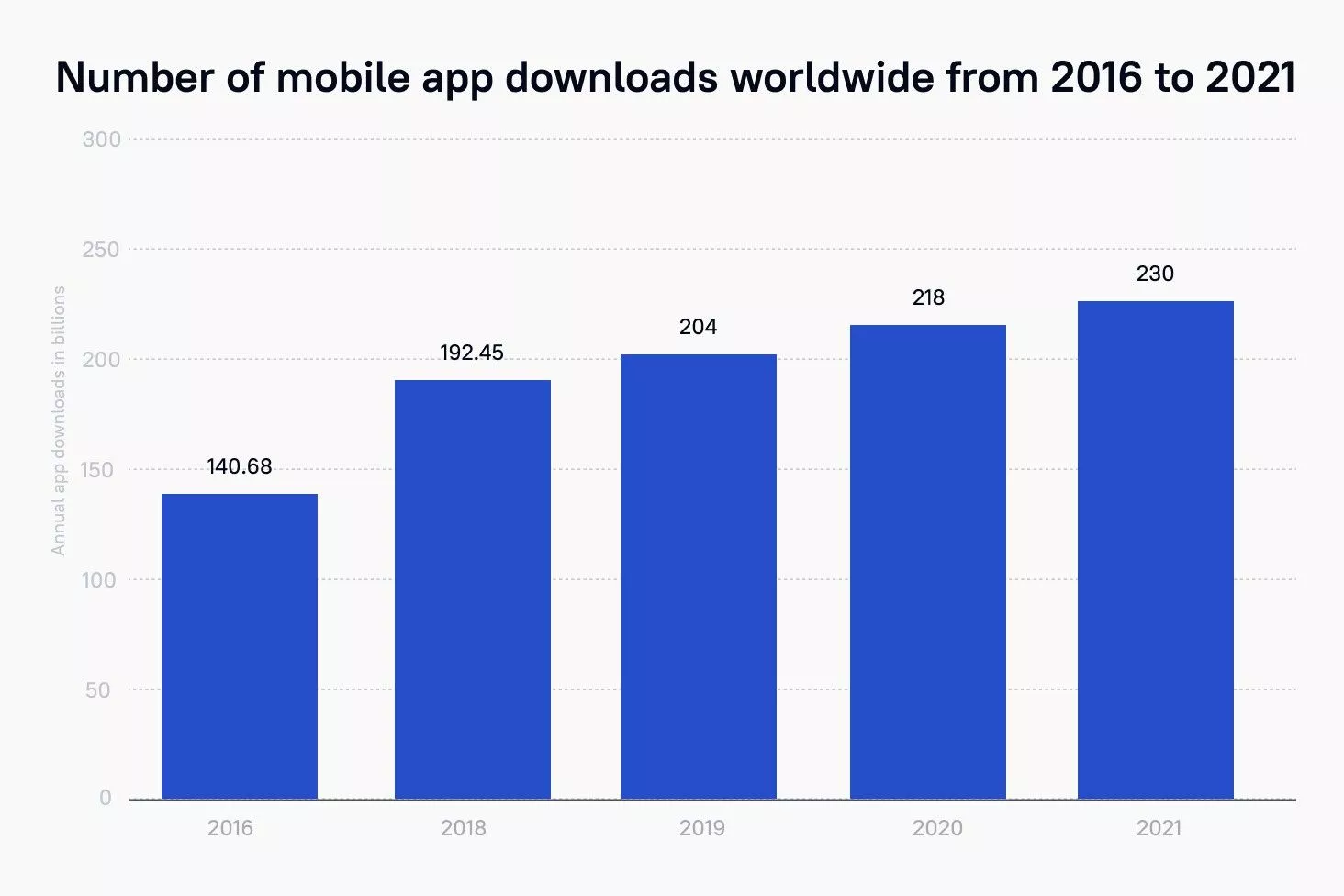
Thousands of new mobile applications are released across major app stores, making usability, performance, and clear user value essential for standing out.
It doesn't matter what you plan to create – a business tool or a student startup with a wide audience. An end user, for whom an app is being developed, primarily appreciates the quality and benefits they will receive from the installation. The quality of a program directly determines its demand, the number of downloads, positive reviews, and high ratings. Let's look at what should be improved at the development stage.
1. High Performance and Reliability
First, the information and functionality provided in the app should be user-friendly. The application should be simple and understandable for ordinary users, which is the cornerstone of quality user interface design services. By installing the app, they have to get a simple, functional, and easy-to-learn program.
2. Intuitive UI/UX and Mobile App Design
This criterion determines how intuitive the app interface is. A user must be able to easily understand how the application works and how to perform a given action.
3. Clear Value Proposition and Core Features
No matter how good the design and user-friendly interface are, the app functionality plays a key role in its evaluation. When evaluating the options the app offers, everyone is looking for answers to such questions:
- Is the product easy to use?
- Are all the features I need to be included?
- Will they answer my questions?
On average, the app evaluation takes no more than 10 minutes, so the functionality should be complete and noticeable without much effort.
Ready to turn your app idea into a real product?
Let’s build a scalable mobile application from concept and design to development, launch, and support
Alina
Client Manager

6 Steps to Create an Application from Scratch
| How to create an app in 6 steps | ||
|---|---|---|
| Development step | What happens at this stage | Key result |
| 1. Define the concept and conduct market research | Define the app idea, goals, objectives, target audience, and initial requirements. Conduct business analysis when needed and choose an appropriate development methodology, such as Waterfall or Agile. | A prioritized product concept, a clear list of requirements, and a shared vision between the client and development team |
| 2. Prepare the design layout for development | Check the design layout, units, platform grids, artboards, layers, asset names, and export settings. Remove empty or unfinished screens and elements before development begins. | A clean, structured, and development-ready design layout that helps prevent conflicts and unnecessary revisions |
| 3. Create UX wireframes and app prototypes | Map the complete user journey, define interface interactions, create wireframes and clickable prototypes, and test usability based on efficiency, effectiveness, and user satisfaction. | Validated user flows and an interactive prototype that demonstrates how users complete key actions |
| 4. Create the UI design and visual style | Bring the interface into a unified Style Guide by defining typography, colors, UI elements, platform-specific details, and screen transition animations. | A consistent visual system and a finalized application interface |
| 5. Complete frontend/backend development and Agile testing | Implement the approved design and application logic, create the interface and code, compile working builds, test the application, fix bugs, and verify that the implementation matches the design. | A functional and tested application build prepared for release |
| 6. Deploy the app and provide post-launch support | Submit the application to the Apple App Store and Google Play Store, meet platform requirements, monitor performance, fix infrastructure issues, update the app for new operating system versions, and improve features using user feedback. | A successfully launched application supported through maintenance, updates, and continuous improvement |
Step 1: Define the Concept and Conduct Market Research
First, you need to come up with an idea for a mobile app. At Stfalcon, we ask the client to provide us with a technical task; if one isn't available, we send a brief for the development of a mobile application. The brief helps prioritize and identify the application's goals and objectives.
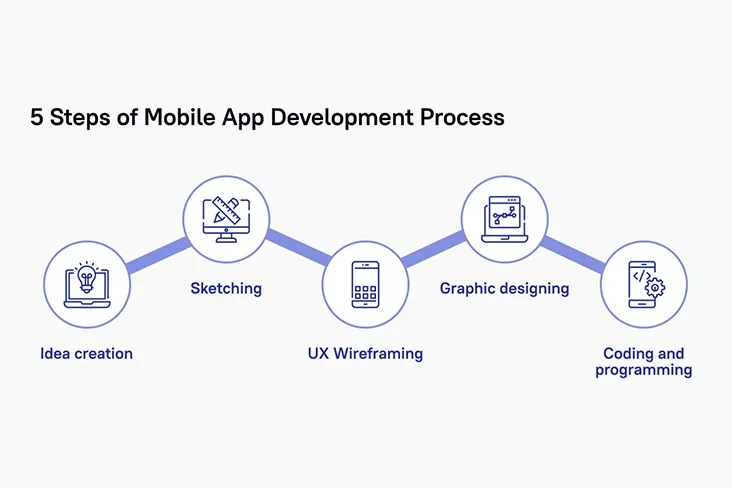
Depending on the type and tasks of the application, different approaches are used when developing: Waterfall and Agile. In both, the process of creating a mobile application includes the same stages: idea creation, analytics, design, development, testing, bug fixing, release, and post-release app support. The difference is in the methodologies. The waterfall model means that the product is built at once. In Agile, an app is developed in iterations, each of which combines all of the above development stages.
Analytics isn't always part of the mobile app development process. It happens that clients independently perform a business analysis of the application, or come with a ready-made list of requirements. But those apps that have passed this stage with the developer company win – it is analytics that helps businesses and developers achieve a common vision.
Step 2: Prepare the Design Layout for Development
The application design layout can be made in any tool convenient for you and your team. As a rule, this is Sketch, XD, Figma, Photoshop, or Illustrator.
Whatever you're working on, double-check that everything inside the layout is in order, namely:
- Uses pt as units.
- Uses an 8x8 pt grid for Android and 10x10 pt for iOS and has snapping enabled (not pixel).
- All artboards are created for base ppi (in @1x or mdpi).
- All artboards, groups, and, if possible, all layers are adequately named ("Rectangle copy 59" or "Group 12" shouldn't be).
- All icons and illustrations are marked as "exportable" and have clear names.
- There are no empty or unfinished screens or elements.
It's just quality control. If the layout is made incorrectly, it will lead to conflicts or edits. Better to do well right away.
Step 3: Creating UX Wireframes and App Prototypes
The main task of developers is to create a convenient ecosystem with perfect UX or wireframing.
At the stage of UX development, the designer must think through the entire user journey from the initial onboarding screens to the completion of targeted actions, which can be several in the application. As a rule, the user journey is a branching tree of possibilities with different functionality: subscribing to an application, contacting support, reading text, paying for goods, and so on. And each "branch" should be well thought out already at the prototype stage.
In interface design, there are several important details that the designer and the customer should be aware of:
- the main application controls should be at the bottom; the upper left corner in the App design is used minimally and only for certain purposes, for example, the "Back" button, since it is difficult to reach it;
- control is not necessarily carried out only with buttons; in the application, the user can swipe or hold certain controls;
- applications can be scrolled both from bottom to top and from right to left. If you use a side scroll, then you should give the user a hint.
An important stage of UX design is testing the usability of the finished interface. It includes the evaluation of the prototype on several parameters:
- efficiency – achievement of tasks by the user;
- effectiveness – the time spent on achieving the goal;
- satisfaction with the quality of service and user experience.
The easiest way to conduct test sessions would be to create clickable prototypes in Figma and record the process of using the service with subsequent feedback. However, there are more advanced services that broadcast the process of user interaction with the application in real time, for example, Userlytics, TryMyUI, and UserTesting.
Step 4: UI Design and Visual Styling
After you have designed the interface, you can move on to the visual component. The main task at this stage is to bring the design to a single Style Guide.
For creating an app for Android, it is desirable to use no more than 5 - 6 types of the same font (of different sizes, colors, and thicknesses) and 4 - 5 colors. It is also worth considering the transition animation from one screen to another: disappearance, shift, preloaded, etc. When choosing colors, it is also worth considering that the iPhone color palette is usually better than Android devices', so you should avoid dirty and adjacent colors.
Step 5: Frontend/Backend Development and Agile Testing
When there is a detailed technical task, the design is ready, and the prototype of the mobile application is approved, development begins. The Android development team embodies the end design in the code – we define all the styles and UI elements that the application's users interact with. What is the process of creating a program for Android? Let's pay attention to a few points:
- Kotlin/Java files – they describe the logic of the mobile application - the functions that you expect from the program. Previously, Java was the primary development language for Android, but Kotlin has since replaced it; you can still use both languages even within the same project.
- XML files – a visible interface is created in them.
- When the program is written, it needs to be compiled into a single file. There are 2 project build options, APK (.apk) and AAB (.aab). AAB is uploaded as an application on Google Play, and the APK is immediately launched on the device to test the mobile application. For assembly and compilation, specialized tools are used.
All utilities and files that help to create and control the program are collected in the IDE (Mobile Development Integrated Environment). Through this program, the code is edited, compiled, and launched.
Note: Eclipse used to be a typical developer IDE. Today, the most popular application development environment is a product from Google – Android Studio. It is developed based on IntelliJ IDEA (produced by JetBrains).
During Android development, it is crucial to connect with the designer. The designer will check the implementation of the application screenshots: whether all the styles match, what the aspect ratio is, how the corners are rounded, etc.
Step 6: App Store Deployment and Post-Launch Support
The development journey doesn't end with successful testing; the final crucial step is bringing your product to the market. This phase involves submitting your application to the Apple App Store and Google Play Store, ensuring full compliance with their strict guidelines and review policies. However, a successful launch is just the beginning. To keep your application running smoothly, you need continuous post-launch support. This includes monitoring performance, fixing infrastructure issues, updating code for new OS versions, and refining features based on real user feedback to ensure long-term growth.
Choosing the Right App Development Approach (Native vs Cross-Platform)
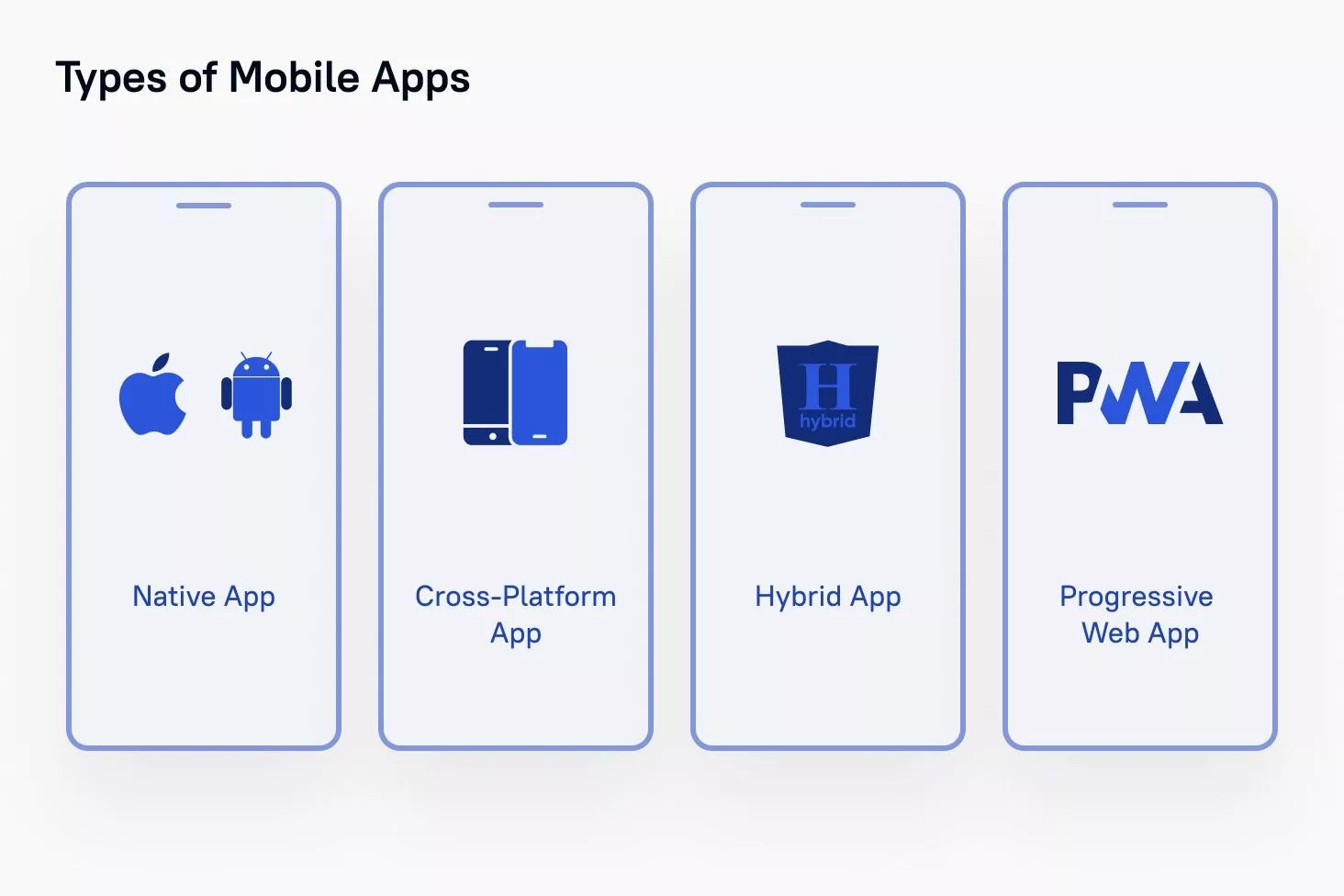
There are four development methods for building mobile applications:
- Native Mobile Applications
- Cross-Platform Native Mobile Applications
- Hybrid Mobile Applications
-Progressive Web Applications
When you choose the right development method for your project, you should consider the desired user experience, development budget, time frames, computing resources, features required by the app, and resources for maintaining the app.
- Native mobile applications are the most common and expensive type to develop, as they are created separately for each OS (iOS, Android, or others). When we talk about mobile applications, we most often mean native ones.
- Cross-Platform Native Mobile Application is a method that allows you to create a single mobile application that runs flawlessly on several operating systems. In cross-platform applications, some of the source code can be shared. This means that coders can build and deploy mobile assets that work on both Android and iOS without recoding them for each platform.
- Hybrid applications are web applications that look like native ones and have their own characteristics. In particular, the desktop icons of the user's mobile device, good performance, and the ability to work offline are key features.
- Progressive web applications are web applications that use modern browser capabilities to provide an app-like experience and can be installed on supported devices.
There are many things to consider when making your app, such as who the users will be, what problems the app is going to solve for its users, what strategies competitors are using to market their mobile apps, and so on. The absence of any of these factors at the design stage can create problems.
Android development is not easy. Many stages of Android development may intersect or run in parallel.
Developing an Android app requires the interaction of more than one specialist. At a minimum, you need a designer, developer, and tester. For specialists with experience in commercial development and knowledge of programming languages. When developing for Android, we use Java and Kotlin. In cross-platform solutions, we work with Flutter.
Conclusion: Turn Your Mobile App Idea Into Reality
You will also need analytics at the preparation stage to develop a high-quality and in-demand application. At Stfalcon, we can help you with all stages of mobile development services, and you will get a viable product. Reach us by email or phone.
Building a mobile application is an iterative process that requires a strong team, from design and business analysis to native or cross-platform engineering. Prioritizing features, selecting the right tech stack, and launching a solid version to the stores is the only way to validate your idea and achieve market success without burning budgets.
At Stfalcon, we bring more than 16 years of experience in helping startups and enterprises launch scalable digital products. Our team provides full-cycle mobile app development, from business analysis and UI/UX design to engineering, testing, deployment, and post-launch support. Contact us today for a free consultation, and let's build an app that drives your business forward!