"It's not on our roadmap, but you can submit a feature request."
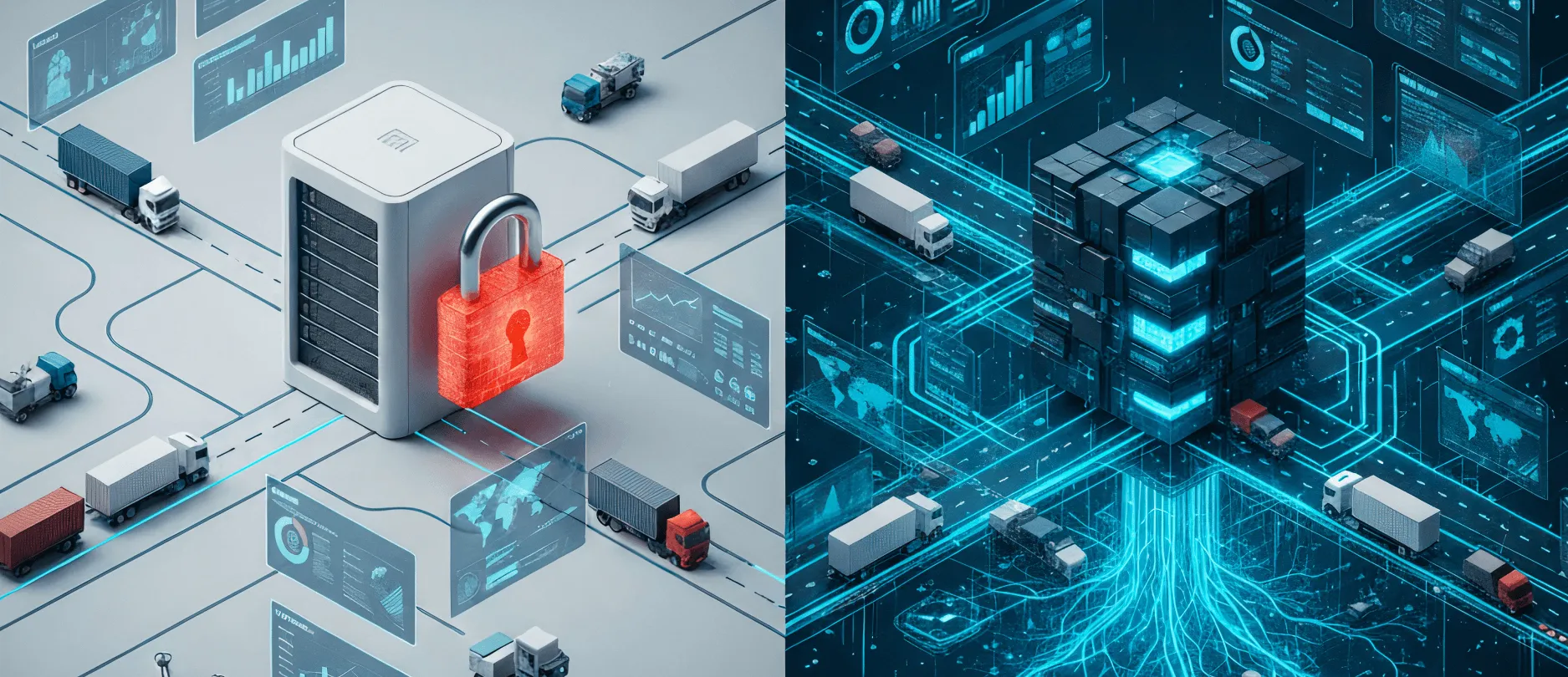
This is how your logistics SaaS turns from an enabler into a bottleneck. Instead of a smooth operation, you are waiting for a vendor update while your team hits a state of manual panic.
This friction rarely shows up as a dramatic system crash. It’s a slow operational bleed:
- Dispatch manually types the same order into two different systems.
- Finance spends days reconciling invoices to deliveries by hand at month-end.
- Support handles angry calls because nobody can see where a truck actually is.
To keep things moving, you stitch together workarounds — midnight CSV exports and brittle Zapier links. These break the moment either side changes a variable, like a renamed database field or a deprecated API version.
It feels like a glitch, but it’s actually the business model. Platforms like Logiwa or Extensiv look flawless because their marketplaces are packed with logos like Shopify and Amazon. But that plug-and-play promise breaks the moment you need to connect something outside their standard catalog.
Later in this article, we break down where standard SaaS connectors run out of road, how a dedicated middleware layer closes the gap, what it takes to engineer one that survives real operational load, and how logistics teams like Stfalcon have done it in production.
TL;DR
Out-of-the-box connectors work fine when your operation is simple. But as you scale past 50 trucks or multiple warehouses, rigid rate limits, missing telematics hooks, and broken legacy schema links turn into a slow operational bleed.
A dedicated middleware layer fixes the gap without a painful system rebuild. It acts as a translator and shock absorber, stitching your WMS, TMS, ERP, and tracking hardware into a single data flow.
If your workflows fit standard SaaS catalog templates, staying with off-the-shelf links is the smartest move. But once your team hits a state of manual panic over brittle CSV workarounds, a dedicated integration architecture becomes a logical necessity.
Owning your integration architecture eliminates double data entry, stops technical firefighting, and protects your operational margins from compounding SaaS taxes.
The SaaS ecosystem ceiling is your operational gap
SaaS marketplaces excel at standard, high-volume e-commerce and retail triggers like Shopify, Amazon, WooCommerce, QuickBooks, and standard EDI connections. But when you run 50 trucks and three warehouses across two acquired fleets, their operational realities stretch far beyond standard online shopping carts.
A SaaS vendor treats every pre-built connector as a long-term liability. Each one requires ongoing maintenance, security audits, and dedicated support staff. This structural mismatch makes their product managers prioritize integrations based purely on mass-market volume.
As a result, a growing logistics company runs into the exact same four structural gaps in a standard SaaS library, over and over again:
| Gap | What it looks like | Why it happens |
|---|---|---|
| Fleet hardware blind spots | No hooks for telematics, ELD, or hardware like Samsara, Geotab, or Wialon | Marketplace roadmaps prioritize e-commerce shipping labels over fleet hardware and telemetry |
| Regional carrier void | Global parcel giants supported well; regional, asset-heavy carriers on older SOAP APIs or file drops are not | Local partners don’t move the needle for a mass-market roadmap |
| Fragile ERP coexistence | Standard connectors built for out-of-the-box ERP; break the moment your schema is customized | Every company’s ERP setup looks different; a generic connector can’t cover them all |
| Rate-limit throttling | APIs cap requests well below what a real operation generates. Extensiv’s Warehouse Manager API, for example, throttles around 100 requests per minute per its published API limits | Limits protect the vendor’s infrastructure, not your throughput |
The cause that connects all these gaps is that the software wasn't designed around the unique combination of systems your business relies on. So your team builds workarounds to bridge the gaps.
And that’s where the hidden tax kicks in. Individually, a quick CSV export or an ad-hoc script looks harmless and cheap. But combined, they create the SaaS cost multiplier, with your monthly subscription quietly stopping being your primary software expense. The real cost shifts to duplicated labor, delayed dispatching, and fragile processes that require constant technical firefighting — a burden that compounds with every new tool you add to your stack.
The four pillars of a real logistics API layer
A custom-built integration layer changes this equation entirely. The constraint shifts from "Does the vendor support this?" to "Does this system have any way to expose its data?" If a tool has an application programming interface (API), a webhook, or even a scheduled file export, a dedicated middleware layer can connect to it.
To build a frictionless data flow, your integration layer has to unify four distinct jobs.
| Pillar | What’s connected | Operational outcome |
|---|---|---|
| Business systems & operations | Logistics CRM integration, logistics ERP software integration, WMS integration services, TMS integration services | Eliminates double data entry: an order, inventory count, or dispatch decision exists once across the stack |
| Data exchange & finance | EDI integration services for logistics, QuickBooks (accounting) integration for logistics software | Keeps you compliant with partners who mandate EDI; automates invoice reconciliation against actual deliveries |
| Fleet & vehicle data | GPS integration development, telematics integration services, ELD integration development (Samsara, Geotab, Wialon, Traccar) | Real-time visibility into asset location and driver compliance, without manual check-calls |
| Last-mile & carriers | Carrier API integration (Shippo, EasyPost), Google Maps integration for logistics apps, routing engines | Automated labels, real-time rates, accurate ETAs mean fewer “where is my order” calls |
Business systems and operations
Connecting your core platforms eliminates the gap between what sales promises and what the warehouse actually holds in stock. These four systems share a single operational objective: they all interact with the same record (an order, a stock count, a dispatch decision) just from different angles.
A five-person operation can manage manual re-entry between a CRM and WMS. A fifty-person operation running multiple warehouses can't. Every new location, product line, or sales rep multiplies manual touchpoints. This creates quiet opportunities for human error until someone downstream notices the numbers don't add up.
Logistics ERP software integration is usually the hardest of the four, because ERPs carry legacy code and years of tailored configuration. Standard SaaS connectors are built for out-of-the-box installs. They rarely support the specific schema modifications a team added five years ago and never documented.
Data exchange and finance
EDI (electronic data interchange) integration is a gate to working with large partners like retailers, 3PLs, and freight brokers who won't onboard you without it. Accounting integration does the same internally, keeping delivery logs and financial ledgers in sync. Data exchange and finance belong together because both handle strict, formal operations with zero room for manual error. A delay in sending an EDI file or syncing an invoice halts shipments and billing just the same.
Both of these integrations are less visible than a fleet-tracking dashboard, but they're often where the real cost of manual work hides. A dispatcher's wasted twenty minutes is annoying and easy to shrug off. A finance team reconciling invoices by hand every single month is a recurring cost that compounds quietly and never fixes itself.
Fleet and vehicle data
This hardware layer links physical trucks and onboard sensors directly to your dispatch platform. It's grouped separately because it answers a single question: Where is the vehicle, and is it compliant right now?
Unifying this telemetry creates room automated geofences. These can automatically alert a depot to pre-stage a loading dock or send a "courier at the door" notification. A good telematics integration services layer adapts to hardware you already own. It ingests data whether your fleet runs Samsara, Geotab, Wialon, or open-source Traccar units. The real decision is whether the API exposes raw telemetry directly to your TMS (transportation management systems) or locks it behind a dashboard you have to check separately.
Cost matters here more than any single feature on a spec sheet. Per-vehicle pricing that looks reasonable at twenty trucks can shift the economics entirely at 200. A fleet that grows through acquisition (picking up whatever GPS hardware the acquired company already had installed) needs an integration layer built to ingest multiple platforms from day one, not a single-vendor assumption baked in early and expensive to unwind later.
Last-mile & carriers
No single API handles parcel labels, customs calculations, and live maps together. This pillar covers everything that happens to a shipment after it leaves the warehouse, split across three different specialist tools.
A complete architecture combines Shippo or EasyPost for carrier API integration, Google Maps integration for logistics apps (or HERE, Mapbox) for routing, and Onfleet or Bringg for last-mile coordination and tracking shipments. Dedicated middleware stitches these tools into a single workflow. It pulls live vehicle coordinates, calculates accurate arrival times, and pushes status updates to a customer-facing map, eliminating the classic "where is my order" call.
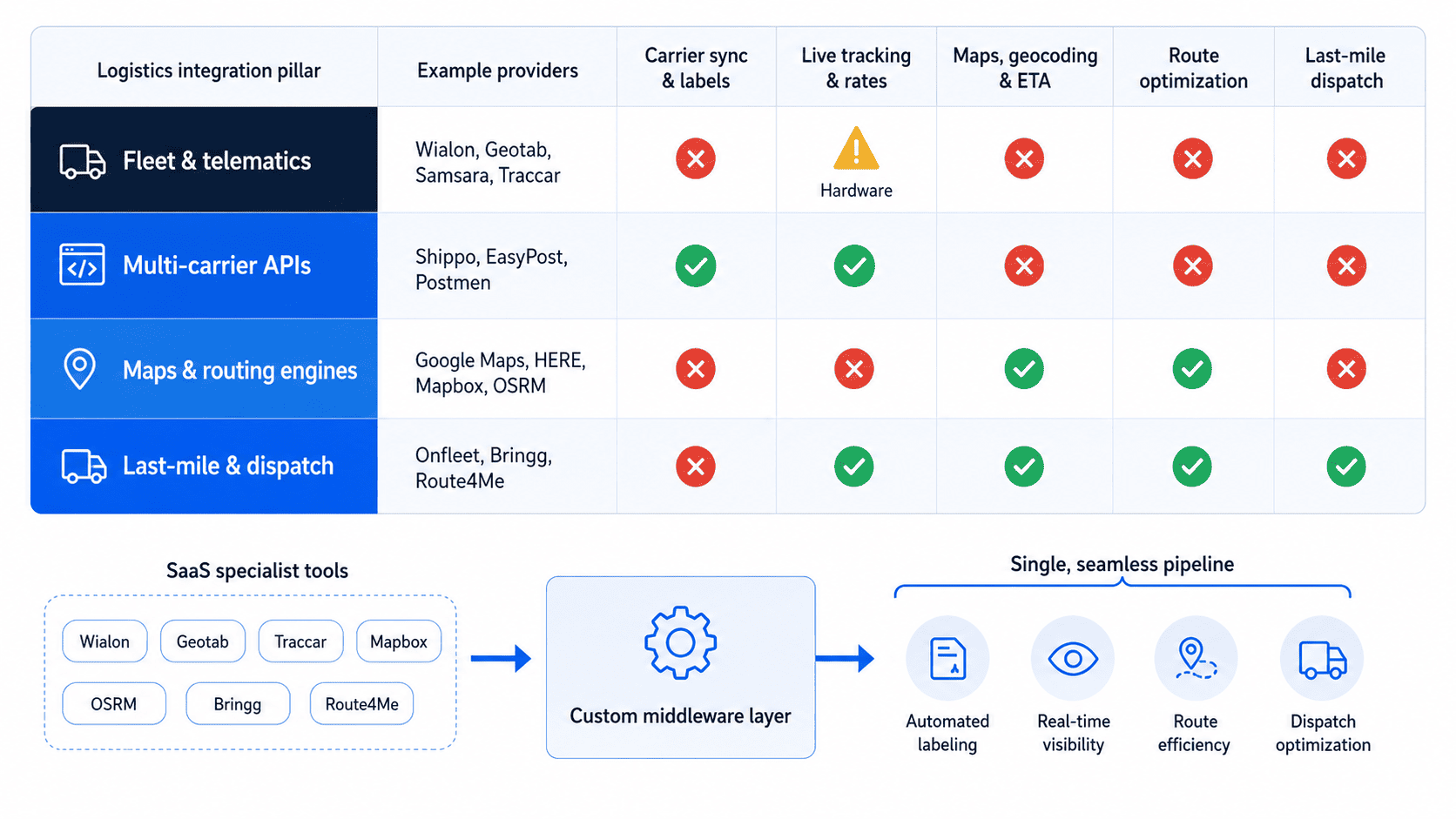
Consider what a typical mid-sized logistics company faces when managing these four pillars without a unified layer:
A difference before and after adding a middleware layer
Here’s a table that summarizes the difference.
| Operational area | Before (fragmented SaaS stack) | After (unified middleware layer) |
|---|---|---|
| Data synchronization | Delayed syncs with manual CSV exports and copy-pasting between systems | Real-time data exchange across ERP, WMS, and TMS |
| Fleet visibility | Dispatch manually checks two separate GPS dashboards every morning | All telematics hardware stream directly into a single screen |
| Finance workflow | Finance reconciles invoices against delivery records manually at month-end | Delivery proof triggers billing automatically, closing month-end days faster |
| Carrier integration | Regional carriers require manual label creation if missing from the vendor list | Custom API connections link regional partners alongside global giants |
Nothing about the underlying systems changed. What changed is that they can now exchange data automatically, on the operation’s schedule.
Stalled by SaaS integration limits?
Share your current tech stack with us, and we’ll show you how a dedicated integration layer can unify your systems.
Alina
Client Manager

How API logistics integration holds up under change
The engineering challenge is connecting the four pillars mentioned without creating a system that breaks under daily operational stress. When companies link tools through direct, point-to-point connections, developers hard-code custom scripts between each pair of platforms. That creates a brittle "spaghetti" architecture.
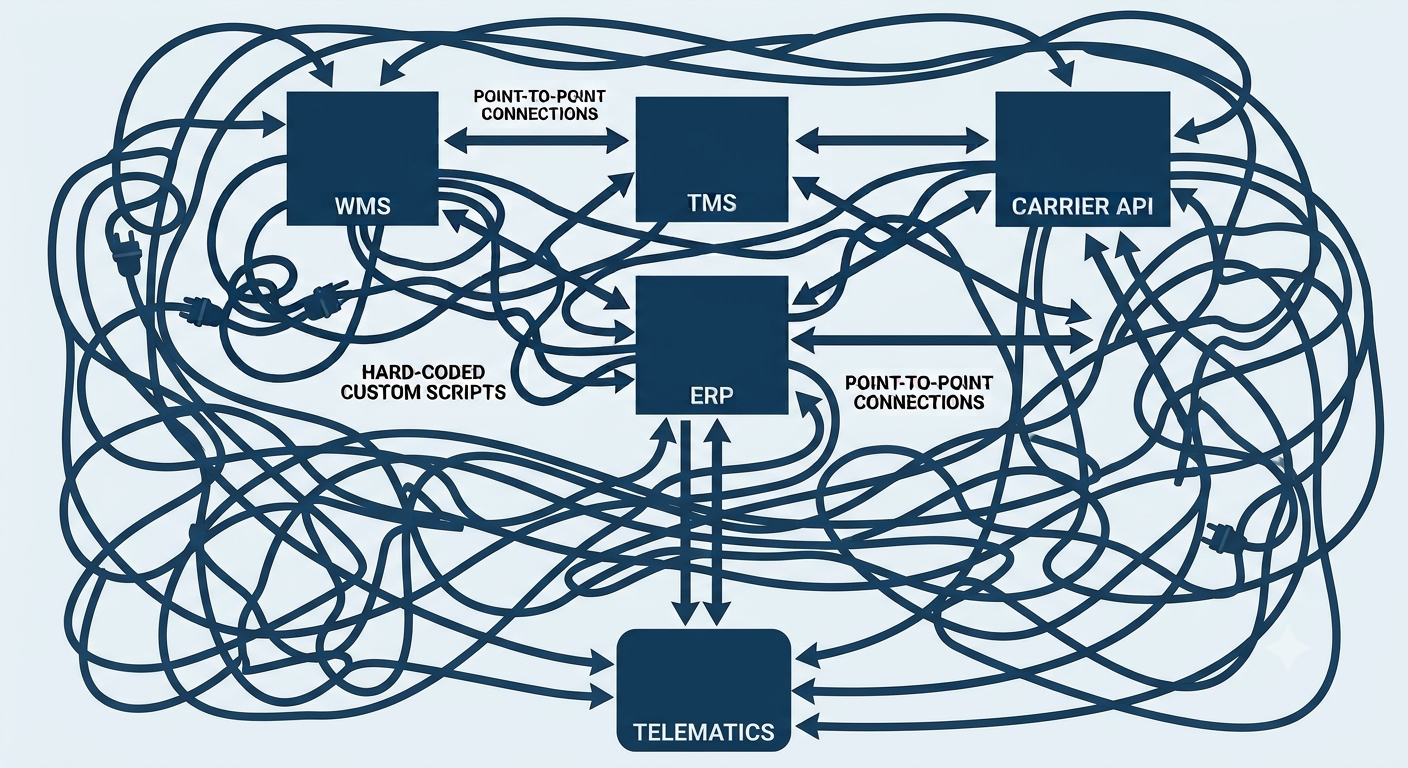
A single schema change on any one SaaS platform breaks the entire web. Every connection in that web is a single point of failure, and you don't control the codebase where the change originates. For example, if your ERP vendor pushes an automatic patch or changes a database schema, the links to your WMS and telematics break immediately. And you couldn’t find out about it until the break happened.
This is the pattern behind most "it worked fine yesterday" incidents. Nobody on your team changed anything. A vendor upstream from your operation shipped an update, and a connection built two years ago by someone who's since left quietly stopped working. Point-to-point integrations fail because they were never designed to survive change on either end.
A dedicated middleware layer resolves this by acting as a translator and shock absorber:
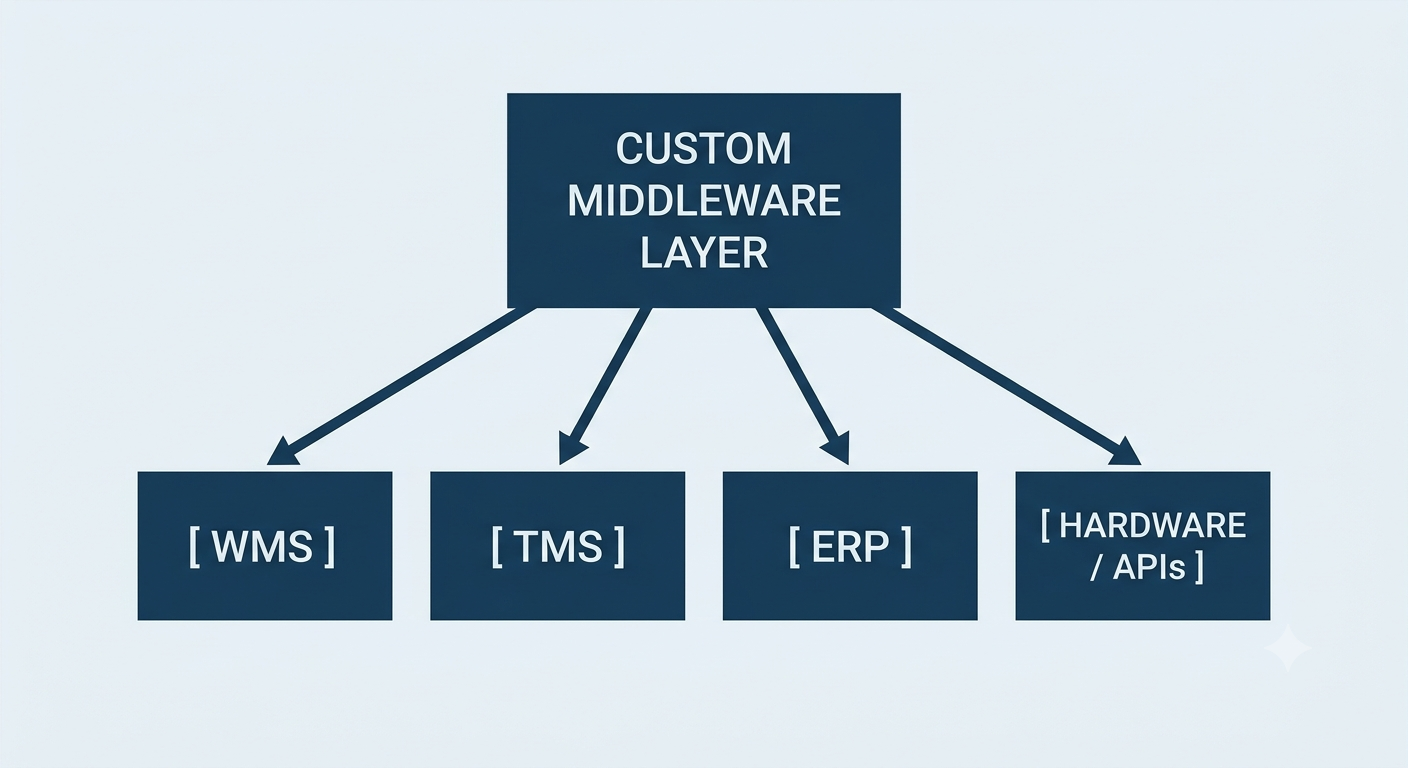
Every system talks only to the middleware, never directly to each other. So if a carrier updates its API version or your TMS changes its data format, engineers modify one connector inside the middleware. Your core database, warehouse operations, and financial workflows keep running without a second of downtime.
Engineering an API in logistics that holds up
A tailored middleware layer has to survive network latency, payload variations, and third-party downtime while it moves data between endpoints. A resilient integration layer follows a structured five-step engineering approach.
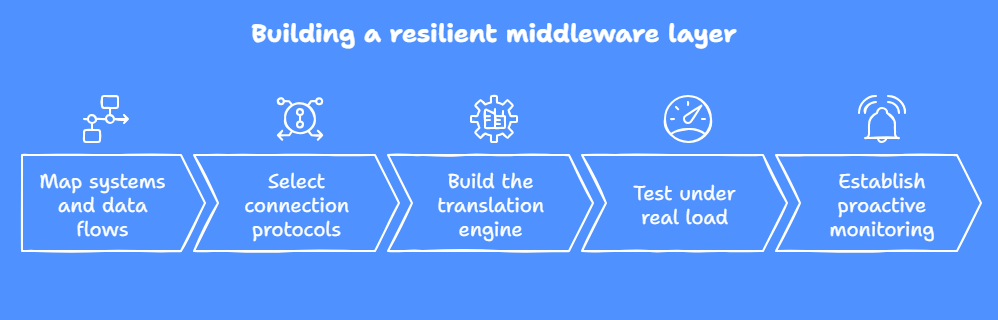
Map systems and data flows
Document what data moves, where it starts, and how often it syncs. Tracing an order from checkout to delivery shows which system owns the master record for inventory, dispatch, and billing while catching schema conflicts before anyone writes code.
Select connection protocols
Modern platforms expose real-time APIs and webhooks, while legacy ERPs and regional carriers often rely on scheduled SFTP file drops. A resilient middleware layer must speak all of these protocols natively instead of forcing legacy systems onto modern standards.
Build the translation engine
As the core of your middleware, this engine ingests data in one format and converts it into the exact structure the receiving system expects. For example, raw GPS coordinates from a telematics box automatically become a clean status update, so your TMS never has to process complex hardware payloads.
Test under real load
Handling ten test pings is easy, but processing real-time updates from a thousand vehicles every 30 seconds tests system resilience. Simulating peak load reveals memory leaks, rate limits, and database bottlenecks under actual operating stress.
Establish proactive monitoring
A loud failure gets fixed in an hour, but a silent one shows up weeks later in a reconciliation report. Automated alerting prevents this by catching errors instantly. If an external API drops offline, the middleware queues outbound data and alerts your team without interrupting active warehouse operations.
Once you understand the engineering steps, the natural question becomes scope: how much overhead does your specific operation actually require?
What actually drives integration complexity and cost
Not every integration layer demands the same architecture. Five variables move timelines and budgets more than any others.
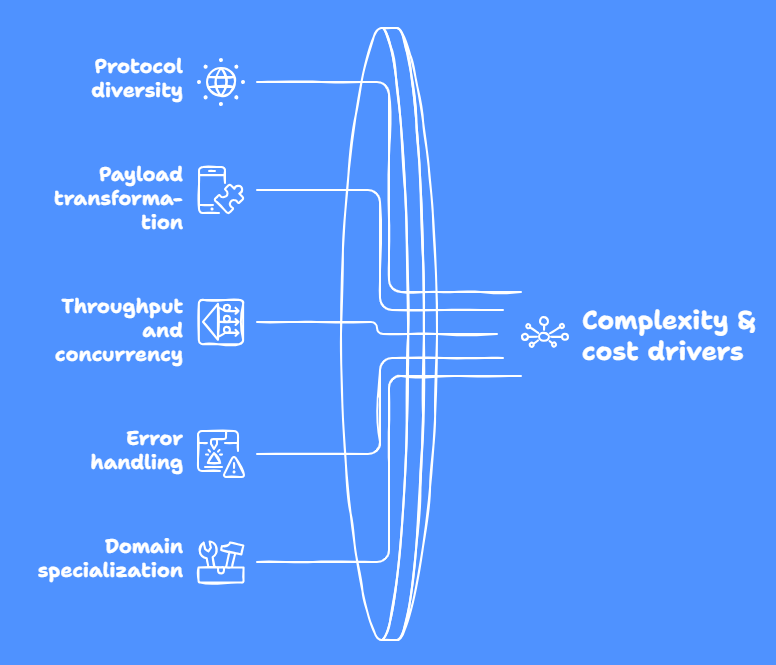
Protocol diversity
Ingesting modern REST APIs and webhooks is straightforward. Complexity climbs when legacy ERPs require SFTP batch drops, XML transformation, or SOAP endpoints.
Payload transformation logic
Mapping static fields is fast. Real-time enrichment, such as turning raw GPS coordinates into a geofenced ETA trigger or calculating carrier-rate arbitrage on the fly, is where build depth lives.
Throughput and concurrency
Handling 50 order events a day needs minimal infrastructure. High-frequency sensor pings from hundreds of moving assets need task queues built to handle concurrent load without dropping packets.
Error handling and queueing
Automated retries, fallback endpoints, and dead-letter queues make sure an external API outage doesn't freeze your warehouse.
Domain specialization
A team without logistics experience carries a discovery tax: you end up funding their research into telematics protocols, carrier rate structures, and EDI formats from scratch.
The price of figuring it out as they go is the difference between a team learning your domain live, on your project, and a team that's already made those mistakes on someone else's.
Our transportation and logistics software development agency has spent 16+ years building integrations exclusively for transport and logistics, which means the baseline discovery phase is already done: pre-mapped carrier connectors, normalized telematics layers, and queuing infrastructure built to handle real throughput. Your budget goes toward connecting your exact stack, not toward someone else's learning curve.
Here’s how our engineering approach works in practice when scaling logistics platforms under high operational strain.
Field example #1. Extending a legacy ERP with a workforce portal ($1.3M+ saved annually)
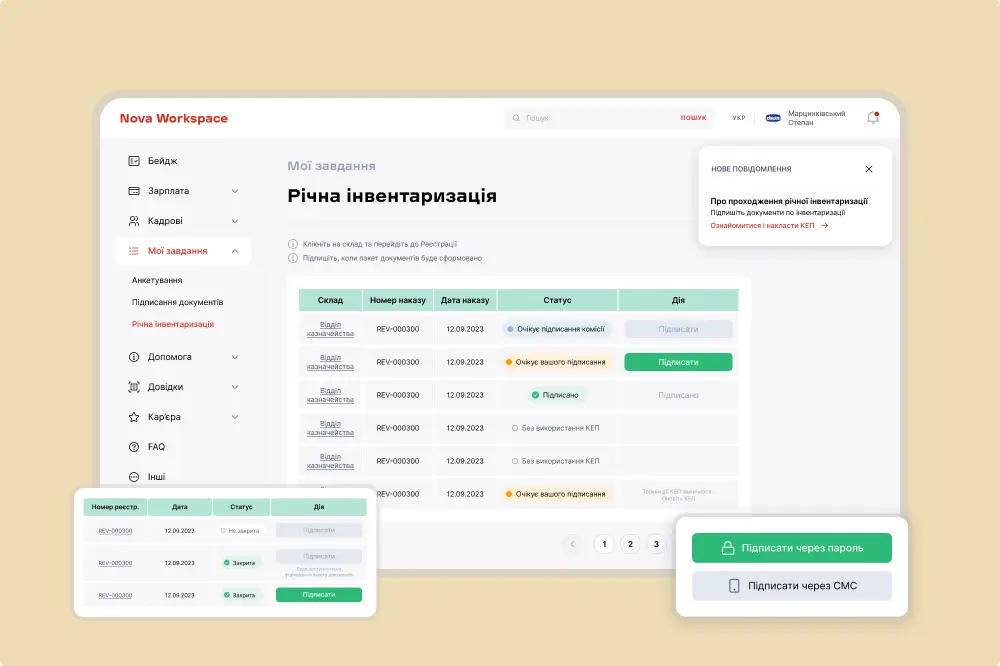
Nova Post is a major European logistics provider processing 1.5M parcels daily through a network of 39K+ service points, coordinated by 38K+ employees. When Nova Post needed to digitalize workforce management and document approvals, off-the-shelf solutions failed. They couldn't integrate with Nova Post’s 1C ERP or handle local legal e-signature requirements.
Instead of a painful, multi-year ERP rebuild, Nova Post partnered with Stfalcon to architect a proprietary platform (Nova Workspace) and a dedicated integration layer linking it directly to their existing 1C ERP setup. Core ERP data remained fully intact, admin overhead dropped by 40%, and Nova Post saved $1.3M+ annually.
 Read the full case study
Field example #2. Replacing a SaaS ceiling with a custom dispatch stack (50K+ monthly orders)
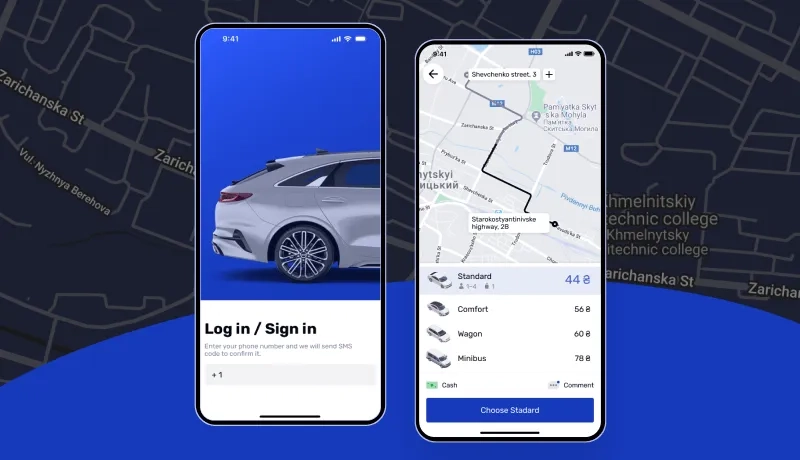
With over 16 years in the market, ride-hailing provider BBGO hit an operational ceiling when its SaaS tool (TaxiAdmin) became too rigid and expensive. Partnering with Stfalcon, BBGO replaced vendor limits with a tailored, integrated dispatch ecosystem. The new setup linked live Google Maps telemetry, custom driver apps, and proprietary pricing algorithms while cutting hosting costs via a zero-downtime GCP-to-Hetzner cloud migration.
While ride-hailing differs from freight, the lesson is the same: when vendor software restricts integration, moving off rigid SaaS restores control over your roadmap and margins. Today, BBGO processes 50K+ monthly orders on an infrastructure built for their exact business logic.
 Read the full case study
Every one of our cases required a different integration pattern, and navigating the nuances without trial and error is exactly what years of domain experience helped us avoid.
Own your integration architecture without stopping operations
When off-the-shelf connectors hit their limits, the answer isn’t more CSV workarounds. If your team is acting as human copy-paste bridges instead of optimizing operations, it’s time to stop waiting for vendor roadmap updates.
Middleware orchestrates the tools you already run today, so you can swap, expand, or replace any of them as the business grows. That buys you the time to build toward a proprietary platform without stopping logistics operations to get there.
Ready to outgrow fragile workarounds?
Let’s map out an integration architecture built around your actual operational workflow.
Alina
Client Manager
FAQ
How does a logistics API solve operational bottlenecks?
A dedicated middleware connects all your isolated software platforms into one continuous data flow. It links your WMS, ERP, TMS, and fleet hardware so they can communicate automatically. This replaces slow manual data entry and brittle file exports with instant background updates. As a result, your team stops fixing double entries and gets full real-time visibility across the entire operation.
What are the real-world applications of an API in logistics?
It takes care of background data movement automatically. Your dispatchers see live vehicle locations without app-switching, finance gets delivery proof instantly for faster billing, and regional carriers link smoothly into your current ERP setup.
Beyond daily tasks, it automates higher-level decisions across your supply chain management workflows, the kind of coordination a modern supply chain runs on. It compares carrier rates in real time to pick the cheapest option for every order, instantly generates shipping labels, and updates inventory across warehouses in a global supply chain. You can even set up automated alerts when a truck approaches a loading dock, keeping your entire operation running smoothly.
When to choose custom API logistics integration over no-code tools like Zapier?
No-code tools and standard SaaS connectors are genuinely great for small fleets or simple workflows. We always recommend sticking with them as long as they cover your needs economically.
Opt for a dedicated middleware layer when your operational volume grows and systems get complex. It handles non-standard database structures, manages heavy traffic surges, and keeps your data safe even if a third-party server goes down.
How much time and cost does a logistics API integration project require?
Every tech stack is different, so costs vary. Modern apps connect quickly, while legacy systems and hardware take more effort. Before investing in custom code, check if your current software just needs better configuration. If you do need a purpose-built solution, hiring engineers who already know logistics tech will save you both time and money.