"Where's Martinez?"
"Should be at the Amarillo depot. Why?"
"He dropped off the board two hours ago. I've got a load waiting, and nobody's picking up."
Martinez was fine. Parked at a truck stop forty miles short of Amarillo, waiting out a rain delay. His phone had a signal, but not the app. The dispatcher found Martinez the old way: called his cell and got the update. Then did the same for the next driver. And the one after that. That was day five of go-live.
This scenario is fictional, but as a freight management software development company, we can state that many companies fear this rollout. And they should.
Generalist development teams don’t know where tracking software systems fail under real operating conditions. They don’t anticipate dead zones, delayed sync events, reconnect conflicts, or dispatch visibility gaps because they've never had to.
Mind you, none of these are rare edge cases. Logistics companies operate through them every day. Teams with logistics experience know that and plan for that from the first sprint. At Stfalcon, we've provided logistics software development services for companies with 8 million passengers and 1,300+ routes, so there is no need to teach us what your drivers will run into on the road.
TL;DR
Trucking apps look like standard mobile apps until they hit the road. That’s where generalist teams run out of answers.
- HOS is a compliance engine with concurrent timers, rolling weekly caps, and mid-route exemptions. Get it wrong, and you're exposed to compliance violations and failed audits.
- Every long-haul route eventually runs through dead coverage. The app needs to queue every action on-device and sync in the right order when the signal returns.
- ERP integration built as a one-way push means data leaves the app, and nothing comes back. Load reassigned? The driver won’t know.
- White-label and SaaS platforms work well initially, but costs and limitations grow with the operation.
- A custom truck app built by a team that’s already solved domain-specific problems doesn’t charge you to solve them again.
Truck management app development breaks where generalist teams don’t look
Vendors usually approach truck app development like a standard mobile app project. And the requirements are nothing new: clean UI, stable backend, push notifications, maps, scanning, and tracking. It all works until the product touches logistics and transportation.
No one argues that the interface matters. Drivers need an app they can use fast, with minimal taps and zero confusion. But the interface is only the visible layer. Underneath it sits compliance logic, synchronization architecture, dispatch workflows, and ERP/TMS integrations that have to work correctly under real operating conditions.
A generalist mobile team cannot build that without first learning it on your project. The question is who pays for that education and when. Here's where the bill might arrive.
| Why truck driver apps break under real operations | |
|---|---|
| HOS treated as a simple shift timer | Offline logic added too late |
| One-way ERP integration designed with no return sync | Testing built around happy-path scenarios |
Failure point 1. HOS logic built as a countdown timer → compliance exposure on day one
A generalist team often treats HOS as a simple timer. The driver starts a shift, the counter runs, and the app shows a warning near the limit. But HOS logic is much more complex than that.
A driver operating under the 11-hour driving limit also works within a 14-hour on-duty window that continues running during breaks. Weekly limits run on rolling 7- or 8-day cycles. Split-sleeper berth rules can partially reset the calculation mid-route and change how remaining drive time is calculated.
Then come the exemptions. For example, drivers operating within 150 air miles under the short-haul exemption follow different compliance rules and may not need a full ELD log at all. A system built around only one compliance model will calculate availability incorrectly for the other.
When the calculation is wrong, dispatch assigns a load that the driver legally can't take. The app doesn't flag it. And by the time anyone notices, the truck is already on the road.
What a logistics-native team does instead:
A vendor experienced in logistics and transportation starts HOS with the compliance model behind it. The team maps the regulation, turns each duty-status change into a typed event, builds the HOS data model, connects it to ELD and dispatch workflows, and tests the scenarios that break after go-live, like split-sleeper calculations, delayed ELD events, edited logs, and offline reconnects.
The UI comes last. By then, the app already knows a driver's regulatory exposure before dispatch assigns the next load.
| How a logistics team builds HOS logic step-by-step | |
|---|---|
| Step | What the team does |
| 1. Map the regulation before the interface | Define the rules behind 11-hour driving limits, 14-hour duty windows, 60/70-hour cycles, restart provisions, exemptions, and split-sleeper logic. |
| 2. Turn duty statuses into typed events | Off duty, sleeper berth, driving, and on-duty not driving are not just labels. Each status changes the compliance calculation differently. |
| 3. Build the HOS data model | Every event needs timestamp, source, driver, vehicle, location, edit history, and connection state so the log remains traceable after sync. |
| 4. Add the compliance calculation engine | The system calculates available drive time, shift-window status, weekly limits, and exemption impact in real time. |
| 5. Connect ELD and dispatcher workflows | Driver status, ELD events, and dispatcher assignments need to use the same compliance state, not separate records that drift apart. |
| 6. Test edge cases before release | Split-sleeper use, reconnect after offline mode, edited logs, delayed ELD events, and assignment changes are tested before drivers use the app. |
Failure point 2. Offline mode as an afterthought → data loss on every rural route
As a rule, teams build online-first apps: every action the driver takes, like tapping a status, scanning a document, or confirming a delivery, fires an API call to the backend in real time. This works in an LTE city. On I-80 through Wyoming, the chain breaks at the first dead zone, and the app has no plan for what goes next.
Another problem is what happens when connectivity returns. A naive implementation tries to sync everything queued at once, creating duplicate events and overwriting updates the dispatcher pushed while the driver was offline.
What a logistics-native team does instead:
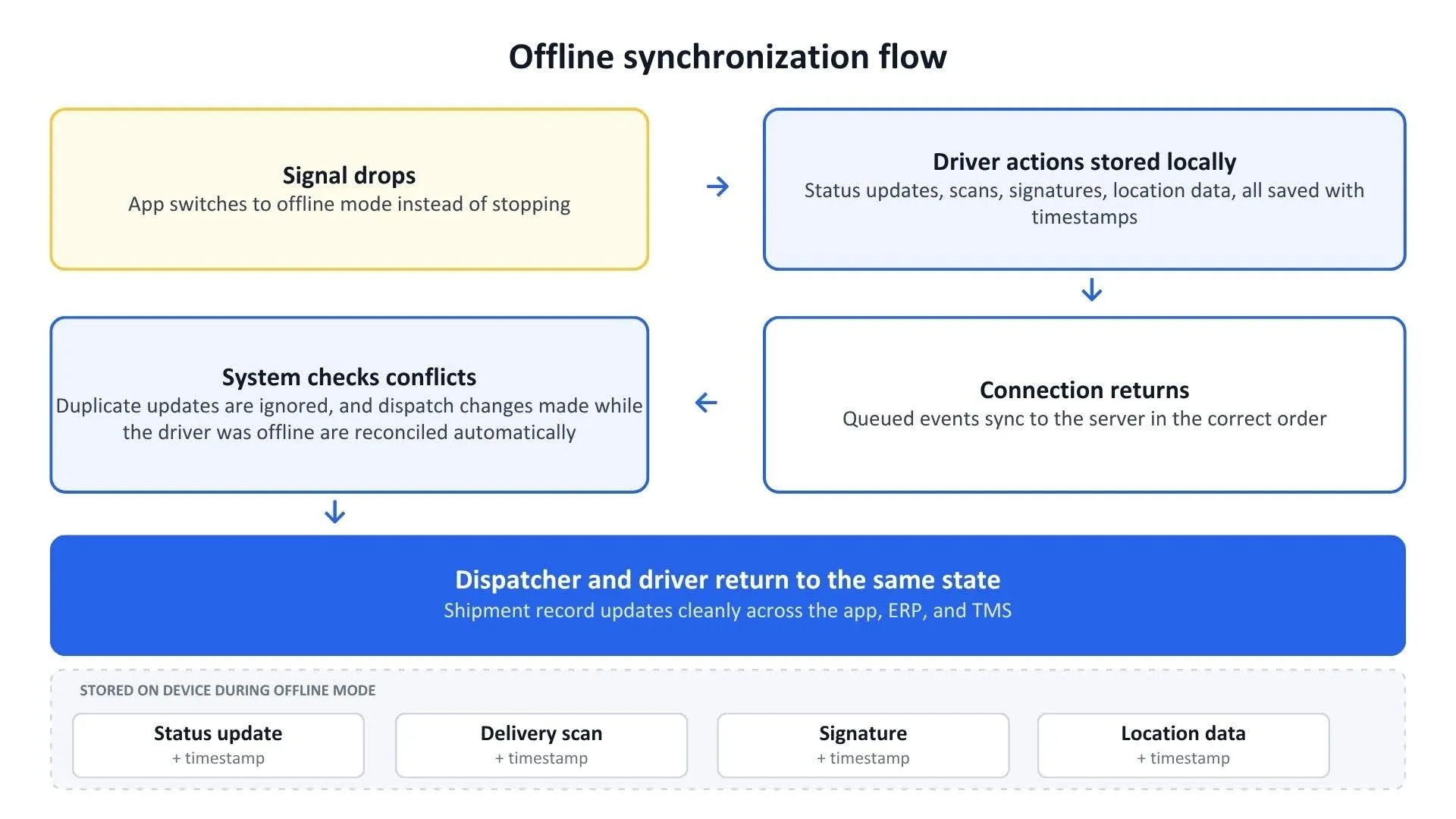
Teams with trucking experience design the app around unstable connectivity early on. Offline mode starts the moment the signal drops. The driver app keeps working and saves every status tap, scan, photo, signature, and location update on the device. Each event is assigned a timestamp and added to a local queue.
When the connection returns, the app sends those events to the server in the order they happened. The sync layer checks for duplicates, skips repeated events, and resolves conflicts against the current dispatch state.
If dispatch reassigned the load while the driver was offline, the system does not overwrite one version with the other. It compares both records and applies predefined rules, so the final shipment history stays accurate.
Failure point 3. ERP integration as a one-way push → data leaves the app, but nothing comes back
7:15 AM. The driver confirms pickup. The webhook fires, but the ERP is mid-restart, so the event drops. Dispatch still sees the load as unconfirmed and reassigns it to another driver. The reassignment doesn't reach the first driver because the integration only pushes one way. Now two drivers are heading to the same pickup. The ERP shows one version of reality, the app shows another, and nobody sees an error.
It happens because a development team built the integration as a simple forward push: app → backend → ERP. Logistics-specialized engineers develop it differently.
What a logistics-native team does instead:
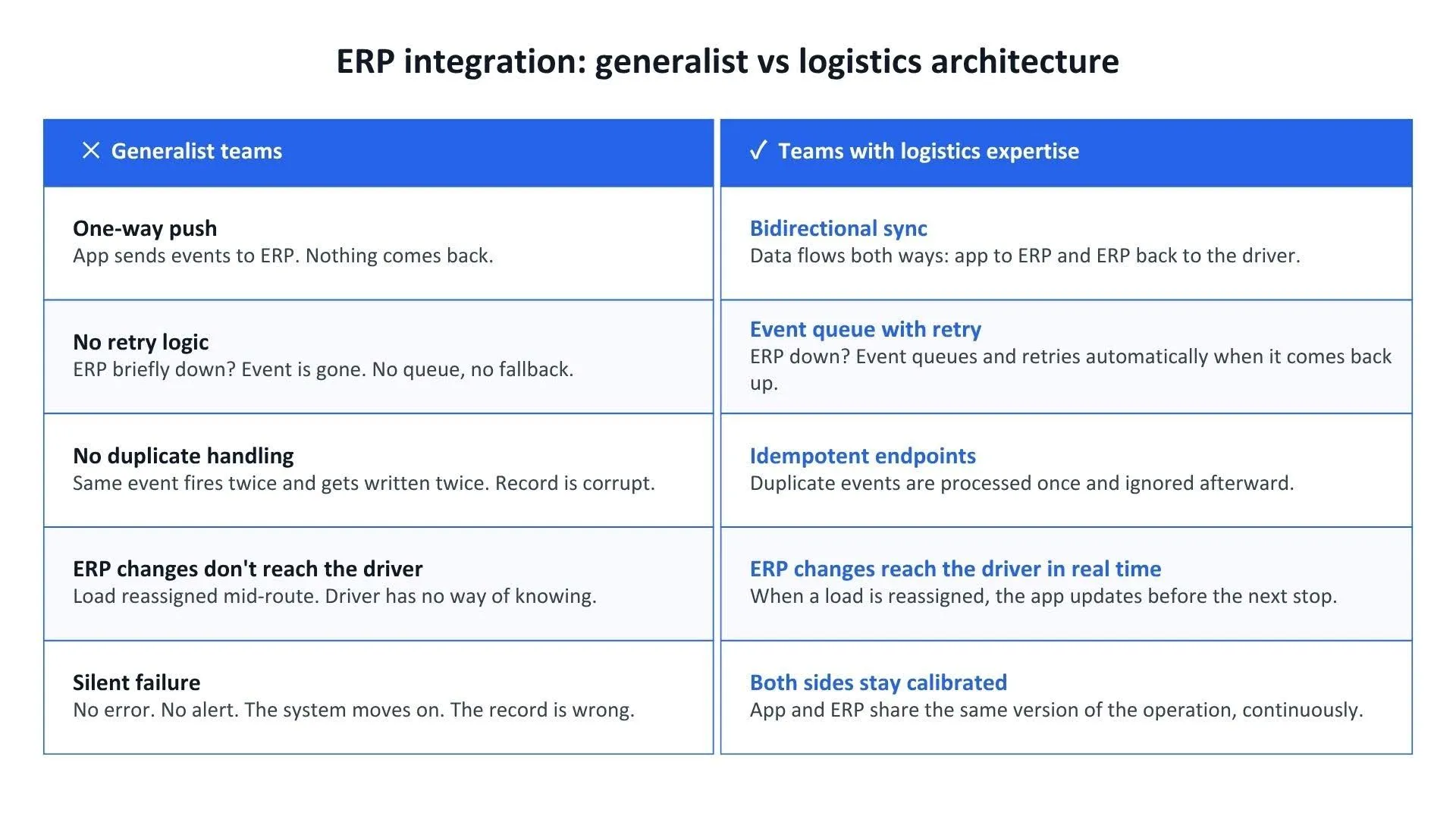
The integration is built as a two-way channel with a protocol that sends, confirms, and listens back.
Every event the app sends joins a queue. The queue holds it until the ERP acknowledges receipt. If the ERP is briefly down, the event waits and retries automatically. When the ERP comes back up, the queue drains in order.
Endpoints are idempotent. It means if the same event fires twice due to a connectivity blip, it writes once. The second copy is recognised as a duplicate and discarded.
This way, the channel runs both ways. Every change that originates in the ERP pushes to the driver's app in near real-time. The driver doesn't have to call dispatch to find out the job changed. The app already knows.
Failure point 4. Testing in a conference room → failures appear on route, at 4 AM
A broad-focus team tests against a feature checklist: functions work, UI renders correctly, API calls return expected responses. QA happens on WiFi, at a desk, with clean data and a full signal bar.
But the failure modes appear when the signal is gone or when the ERP just pushed a load change. And this is when it should be tested.
What a logistics-native team does instead:
A team that has shipped transportation software knows which scenarios surface in production because they've seen them before. Here’s how experienced engineers uncover those failures before go-live:
- Simulate dead zones and bring the app back online mid-operation to see what the sync layer does.
- Throttle connections to replicate high-latency rural corridors.
- Fire concurrent updates from dispatcher and driver simultaneously, and watch which version wins.
- Send malformed payloads from legacy ERPs and verify the integration handles them without corrupting the record.
When you know where generalist teams fall short, a partnership with one looks far less attractive, right? But to be fair, teaming up with a tow truck app development company isn’t your only option. Let’s see how far other options can get you.
White-label on-demand tow truck app development won’t cut it either, nor will SaaS
A generalist team is off the table, so the next question is: white-label or SaaS?
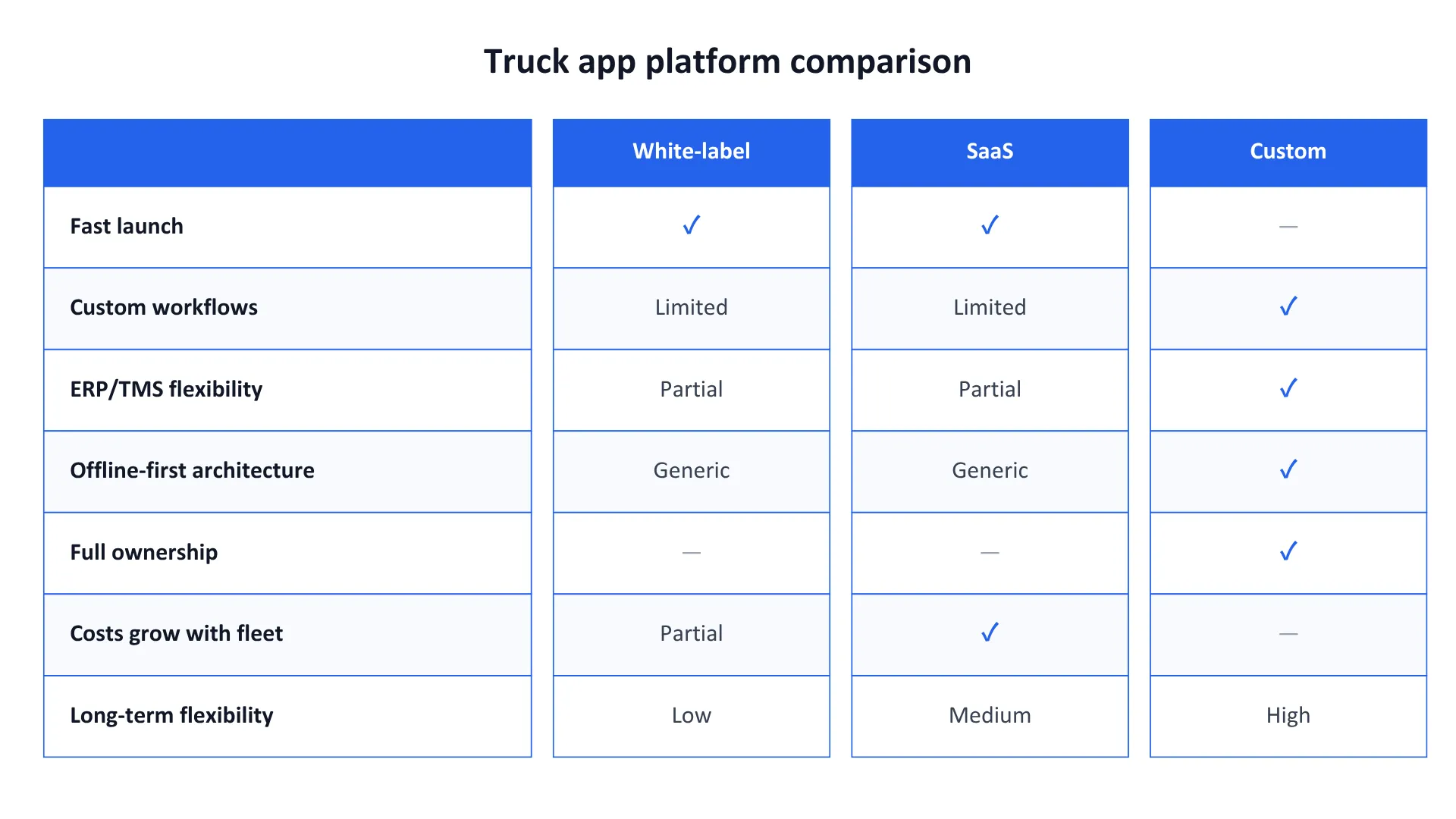
In terms of logistics and truck app development, white-label is faster to launch, and SaaS is cheaper to start. But those benefits don’t last long. As your business grows, both start to cost you in ways the initial price tag didn’t show.
White-label → built for the average fleet, not yours
White-label truck booking app development gives you a working truck driver app out of the box. Route display, status updates, document scanning, and basic HOS tracking are all there. For fleets with standard workflows, it’s enough to get moving.
But once your operation steps outside the template, the platform starts slowing you down. Your dispatch workflow doesn’t match the way the system works, so you submit a feature request. A regulation changes how HOS exemptions should be calculated, and you wait for the vendor to roll out the update. Meanwhile, your fleet keeps operating under the old logic.
It's a similar problem to hiring a generalist team, but with a longer lag. The moment your operation needs something the template wasn't built for, you're back at the build decision. Except now you're starting late, carrying the technical debt the white-label layer created, and again looking for a team that knows trucking.
SaaS → cheap upfront, expensive at scale, and also limited
SaaS looks even simpler. Subscribe, configure, and go. In year one, the math is straightforward and doesn’t hit your wallet, especially when compared to food truck app development or on-demand tow truck app development from scratch. The real cost appears in year two or three, when your operation outgrows what the platform was designed to handle.
You need more advanced reporting, so you pay for an additional module. You need a new integration, so you either pay the vendor for it or discover the platform doesn’t support it at all. Then the only option is building custom services around the SaaS product anyway.
At the same time, subscription costs grow with the fleet. More drivers, vehicles, shipments, or users mean higher monthly fees.
Eventually, the platform that looked cheaper at the start becomes expensive to extend and difficult to adapt to your operations. And sooner or later, the conversation circles back to custom software development, where subscription costs don’t increase every time you add another vehicle.
At that point, proven transportation experience moves to the forefront.
What the experienced tow truck app development team already knows and can
Stfalcon has 16+ years in transportation and logistics. The proof is in our projects.
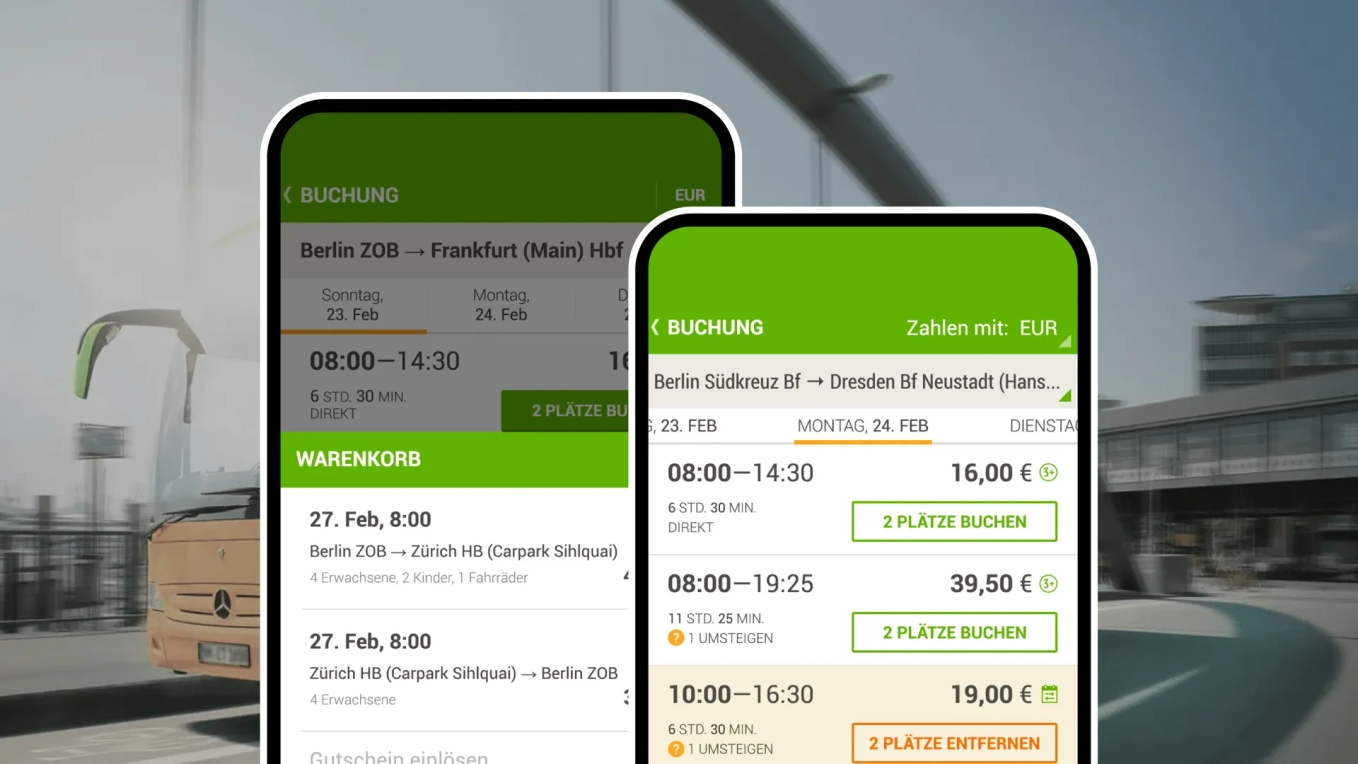
One of them is a low-cost intercity bus operator. Stfalcon helped build the booking and operational platform during the early stage of Germany’s deregulated intercity bus market.
The system supports live bookings, route management, partner integrations, and real-time operational data across hundreds of routes. By 2014, the platform covered 38.5% of Germany’s intercity bus routes and became Europe’s largest long-distance bus operator. Today, it’s 8 million passengers and 1,300+ routes across Germany and Europe.
 Read the full case study
Agree, trucking isn't intercity buses. But offline sync, ERP integration, real-time dispatch, and scheduling logic that has to resolve correctly under operational load are the same problem. A team that solved it at that scale already knows where it breaks.
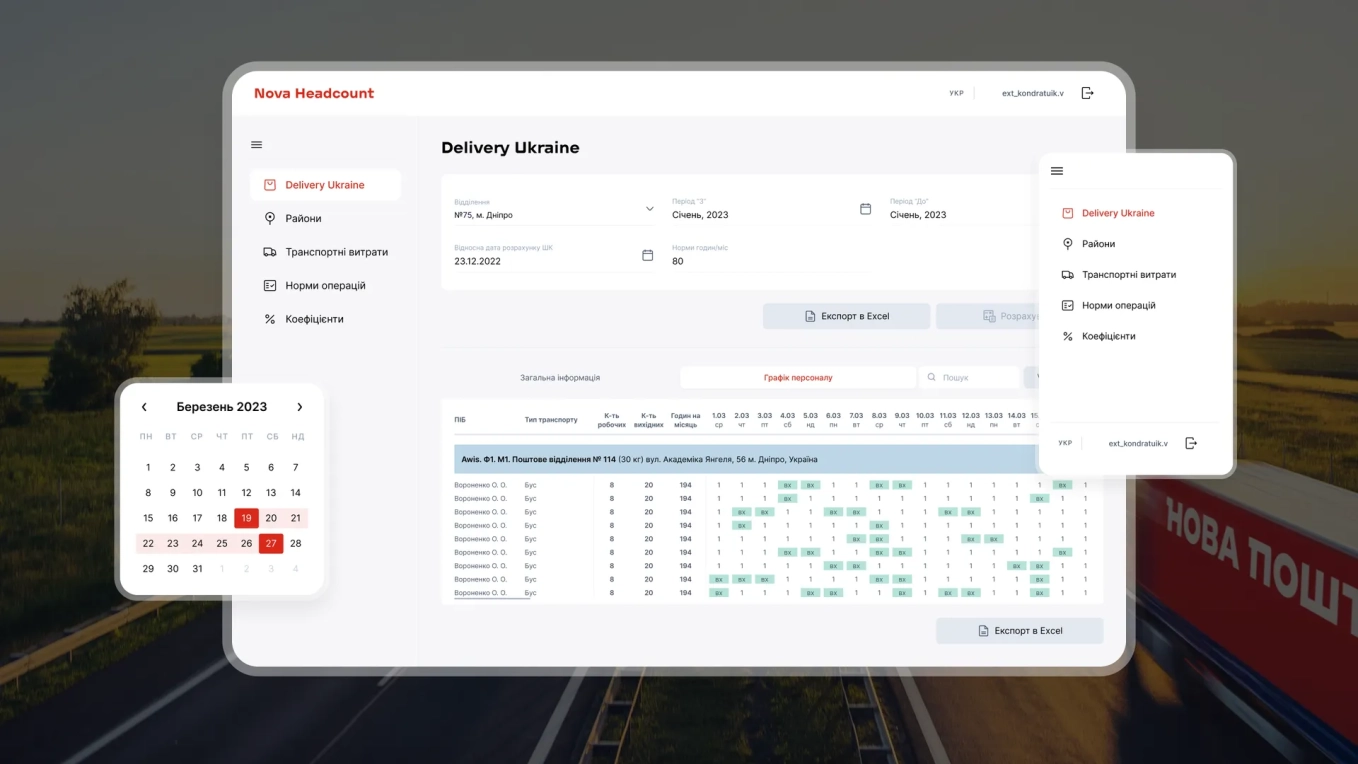
Another example is Nova Headcount, built for Nova Post, one of the largest logistics companies in Eastern Europe. The platform automated workforce planning across more than 13,000 post offices and 38,000 employees. The system predicts workloads, calculates staffing needs, and generates schedules automatically based on operational variables.
 Read the full case study
You might think again: how is that related to truck app development? Workforce scheduling and driver duty-status management look different on the surface. Underneath, they're the same rules that have to resolve correctly in real time, under live data pressure, with no margin for a wrong answer. We’ve built that system for nearly 40,000 employees, so we don't need to figure out how to implement it for a fleet of drivers. We already have.
Need a truck app designed around your operations?
Let’s discuss your use case.
Alina
Client Manager

Yet, whether you work with another vendor or us, make sure the team understands logistics.
Before you hire a team for tow truck booking app development, run this checklist
Not every development partner, no matter if you’re looking for truck rental app development or truck management app development, will tell you upfront what they don't know about trucking. These checks will.
- HOS compliance
- They can walk you through how they'd model split-sleeper berth calculations (not describe it conceptually, but map the data model).
- They treat HOS as a compliance engine with typed duty-status transitions.
- They've built for FMCSA Part 395 or EU tachograph regulations before.
- Offline architecture
- They can explain what the app does when the driver loses signal for two hours and reconnects.
- The event queue lives on the device.
- They handle conflicts between what the driver logged offline and what the dispatcher pushed while the driver was unreachable.
- ERP/TMS integration
- The integration is bidirectional: data flows back from the ERP to the driver in real time.
- They handle failed webhook delivery with retry logic, not manual recovery.
- Endpoints are idempotent: the same event firing twice writes once.
- Testing
- They test against simulated dead zones and high-latency connections.
- They test with malformed payloads from legacy ERPs.
- They can show edge-case test coverage before go-live.
- Track record
- They've shipped transportation or logistics projects in production.
- They can name specific failure modes they've encountered in prior logistics projects.
- They answer all of the above without hesitation.
Does your current shortlist pass this checklist? If not, we're ready to talk.