Your enterprise resource planning (ERP) holds the master version of your business data. Meanwhile, your warehouse and transport systems hold what's happening on the ground, or in other words, things like how much stock is on the shelf or where each delivery is. When the two can't talk to each other, someone is probably re-keying orders by hand and inventory may run a day behind. Not efficient much, right?
With logistics ERP software integration, you connect your ERP with said systems, so the two sides always work from one source of truth. Connecting them sounds like a straightforward technical job — wire the systems together and let the data flow — but it’s rarely that simple.
At Stfalcon, we’ve spent 17+ years building software for logistics and transportation companies — workforce platforms, booking systems, custom logistics platforms — including the internal workforce system behind Ukraine's largest private delivery service, which now saves them over $1.3M a year. This guide is what we've learned about connecting an ERP to the systems around it.
TL;DR: What logistics ERP software integration is about
Logistics ERP software integration connects your ERP with your TMS, WMS, and other systems so data moves between them automatically. Seven things to know:
- Decide who owns what first. When two systems hold the same fact, only one has to be the source of truth. Settle that before you connect anything.
- Know what data moves, and which way. Orders flow out from the ERP; results flow back. Most of the data travels one direction.
- Pick the right connection method. There are four, from a ready-made connector to a fully custom layer. The right one depends on your systems.
- Understand what drives the cost. The number moves on how much you're connecting, the state of your data, and what the integration has to handle.
- Roll out in stages. Map, agree ownership, set the rules, pilot, then go live step by step, so you don't break what's running.
- Plan for what breaks. Mismatched codes, clashing statuses, and duplicate messages are common and preventable.
- Measure the outcome. It works when all your logistics systems hold correct data.
First: The question logistics ERP software integration must answer
Before you connect your ERP to anything, one question to settle is: when two systems claim the same fact, which one is right?
An integration moves orders, inventory, and shipment data between your ERP, your TMS, and your WMS, so it travels on its own. But the systems don't always agree. For example, your ERP says 400 units, your WMS says 380…and both are sure they're right.
The way to settle it is to remember the core job of each system:
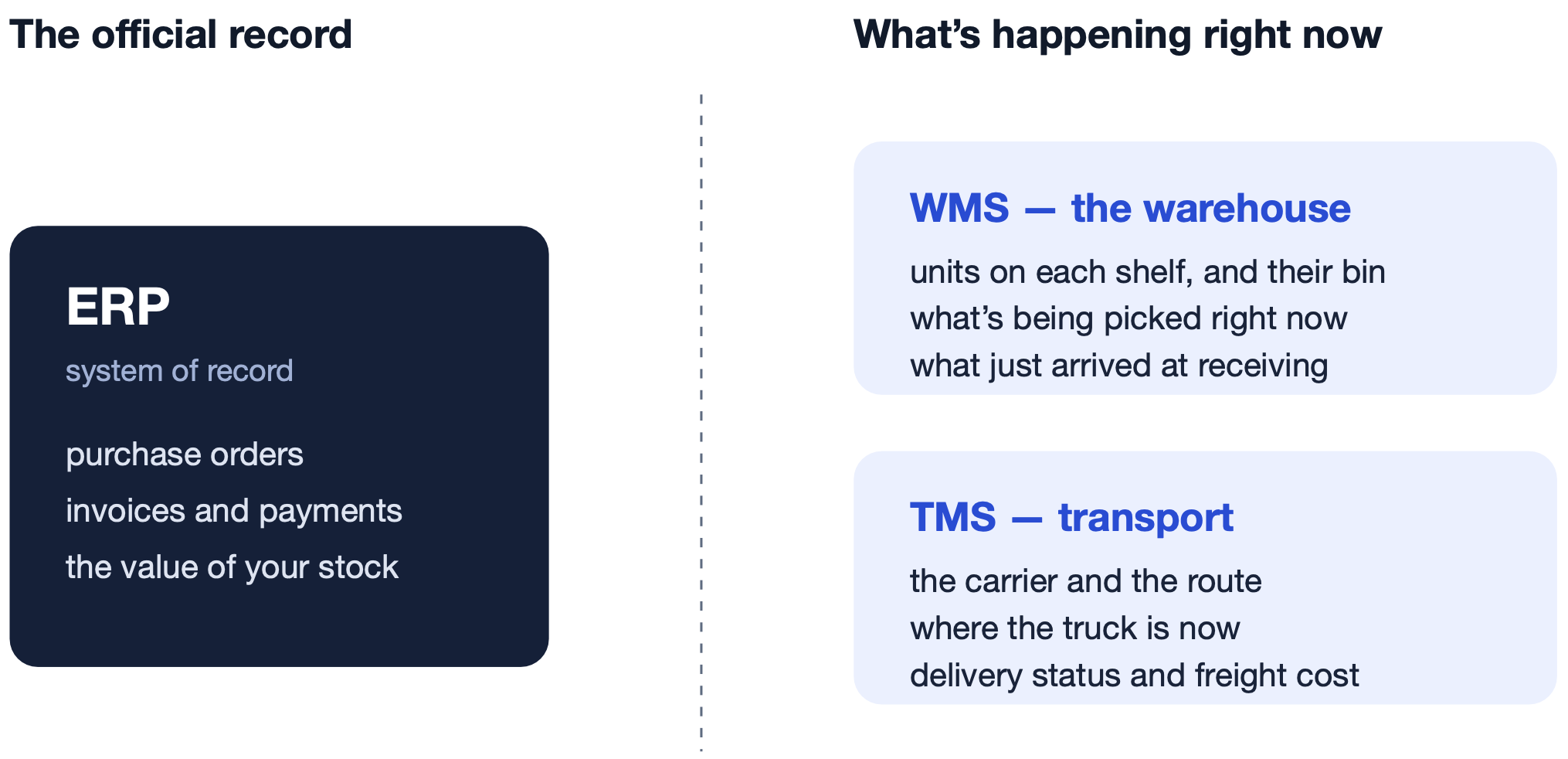
- The ERP is your system of record. It owns the official numbers, including purchase orders, invoices, the financial value of your stock.
- The WMS runs the warehouse. It tracks the live detail: units on each shelf, which bin they're in, what's being picked right now.
- The TMS handles transport. It manages the movement: the carrier, the route, and where a shipment is right now.
The catch is that these jobs often overlap. For instance, one team runs a separate WMS, while another keeps stock inside the ERP's own warehouse module. So where the line falls depends on the systems you run, and you have to map it out yourself.
Take inventory. Both your ERP and your WMS can track stock, so you decide: the WMS owns the live count on the shelf, because it's closest to the physical goods, and the ERP owns the financial value of that stock, because it's your system of record. Do that for each piece of data that more than one system touches, and the result is your map.
This is where integrating ERP with logistics software begins. Because until you settle what logistics system owns what piece of data, you can't decide what to connect or which way it flows.
Second: The data your ERP must share with TMS and WMS
The ERP shares the data each system needs to do its job and keep its own records straight. This is mainly orders going out to the warehouse and transport systems, and results coming back. Most of the data flows in one direction only.
| Data type | What's in it | Flow | Why it goes this way |
|---|---|---|---|
| Orders | Order lines, quantity, delivery address, delivery window, external IDs | ERP → WMS, TMS | The order is created in the ERP. Warehouse and TMS can’t act on it until they have it. |
| Inventory and warehouse activity | Receipts, dispatches, quantity adjustments, stock reconciliation | WMS → ERP | These happen in the warehouse, so the WMS records them first. The ERP needs them to keep its stock numbers correct. |
| Transport results | Delivery status, actual freight cost, proof of delivery, order link | TMS → ERP | The TMS has this data first. The ERP needs it to bill the customer and close the order. |
| Reference data | SKU, customers, carriers, warehouses | ERP ↔ WMS / TMS (per field) | One system owns each record and sends updates. The others only read it. |
| Returns and exceptions | Partial deliveries, cancellations, returns | WMS / TMS → ERP | The ERP's records have to be updated to match what actually happened. |
Some of this has to move in real time, like a new order or a stock shortage. Other data, like a full stock count, can sync on a schedule. Now, here’s an ERP integration example for logistics workflows.
Case in point #1: How one order moves through your ERP, WMS, and TMS
Take a single order, from the moment a customer places it to the moment you bill for it.
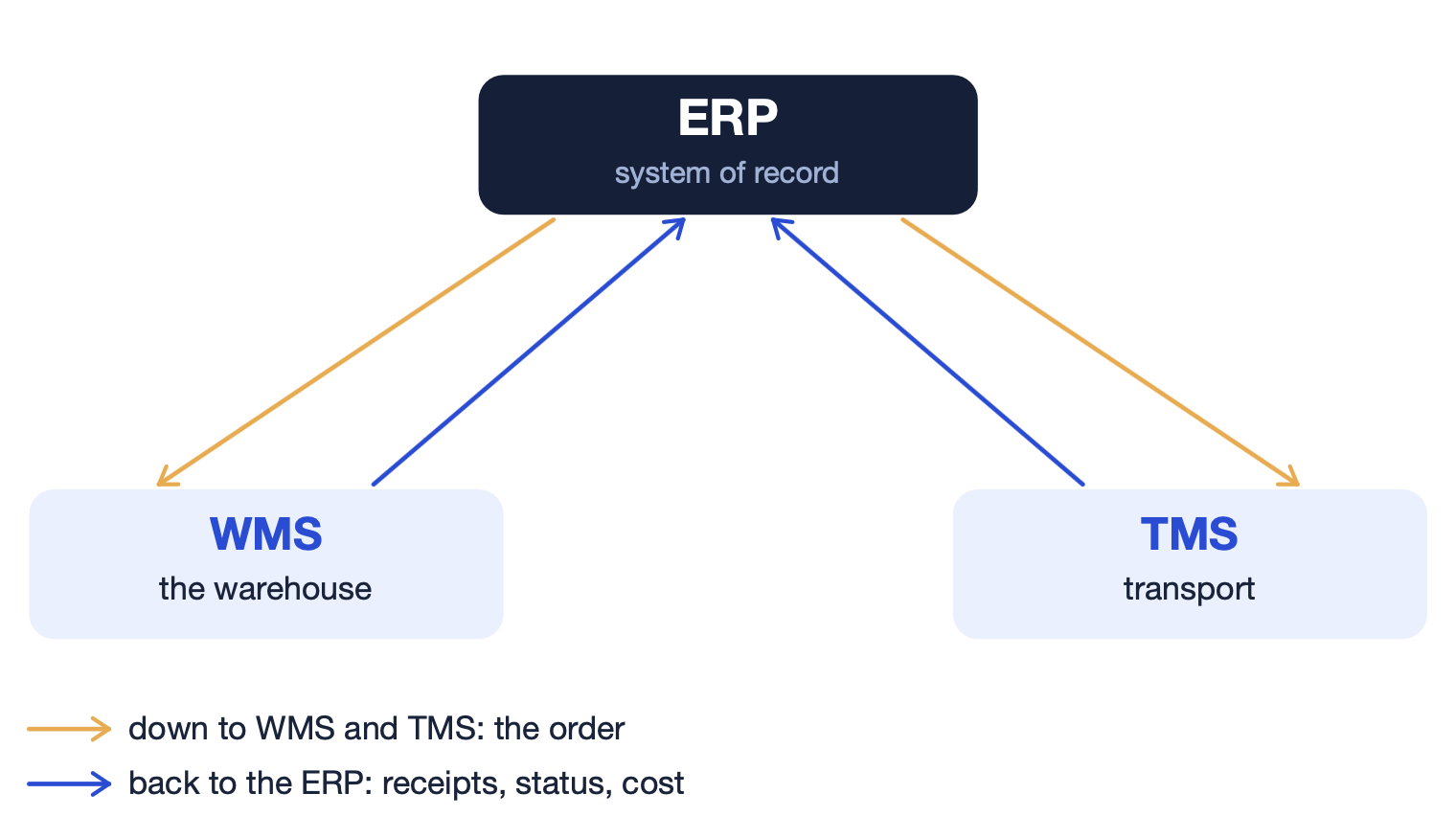
The order lands in the ERP, which sends it straight to the WMS to pick and pack and to the TMS to plan the delivery. This has to move in real time, because nothing can start until each system has the order. Each system gets the items and quantities, the delivery address, and the delivery window.
The warehouse ships the goods and sends the dispatch back. The TMS delivers them and returns the delivery status, the real freight cost, and the proof of delivery (POD). Some of this data comes back right away, some after the run is complete. Now finance can match the shipment to the order, confirm the cost, and invoice from real numbers.
Case in point #2: How a goods receipt moves from the dock to your ERP
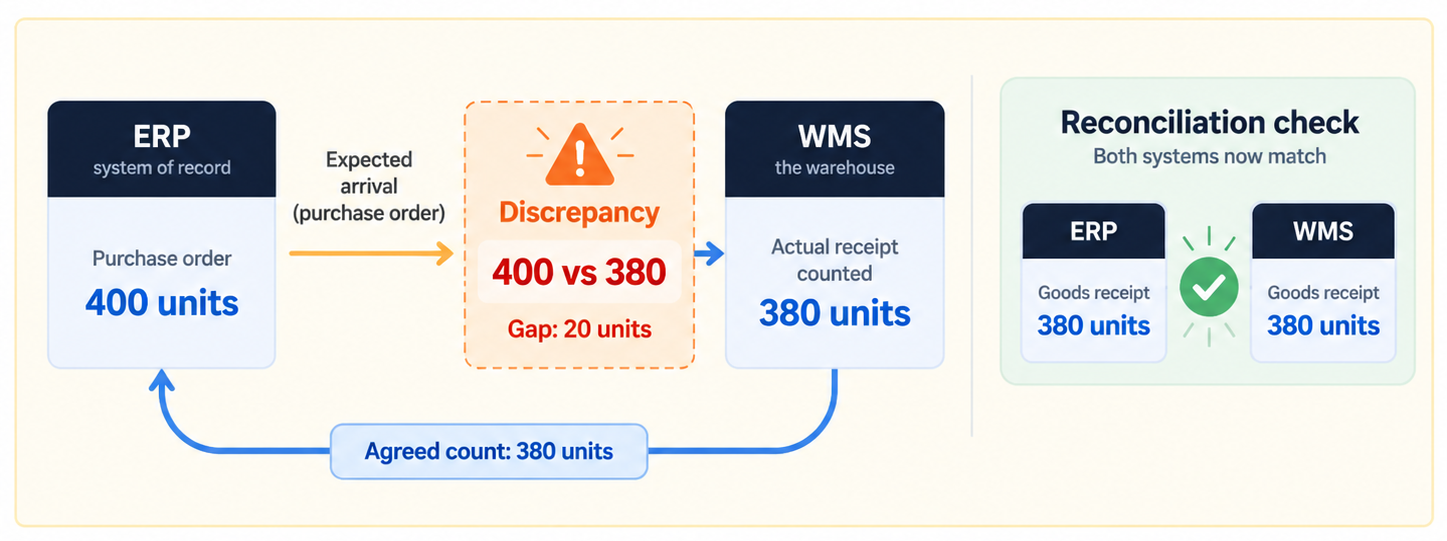
Let’s also look at the delivery arriving at the warehouse, from the expected shipment to the stock numbers lining up. The ERP holds the purchase order of what's meant to turn up, and in what quantity, and sends it to the WMS ahead of the delivery. The WMS needs it to know what to check the goods against, so this moves before the truck arrives.
The goods come in and the warehouse counts what's physically on the dock, including units, SKUs, and the goods condition. Then the WMS compares that against the purchase order, because if, for example, the PO says 400 units, the dock has 380, and the WMS flags the gap instead of quietly accepting either number. Each mismatch is logged against the order line, with a reason attached.
Once the receipt is confirmed and the discrepancies are settled, the WMS sends the agreed numbers back to the ERP, so that the ERP updates its stock and the financial value of it. Each receipt carries an ID the ERP recognizes, so a message that arrives twice is booked only once.
Now the two systems hold the same count: the WMS the live figure on the shelf, the ERP the financial value of it. A scheduled reconciliation compares them and surfaces any drift, so nothing sits wrong unnoticed. The goods receipt is where ERP and WMS most often disagree, which is why settling the number here, before it reaches your books, is the step that matters.
But how do you build the connections? This is the next question we cover.
Third: Main ERP integration approaches, and how to choose
The right approach to connect an ERP depends on how many systems you're connecting and how standard they are. There are four such common ways:
| Approach | When it fits | What to check |
|---|---|---|
| Prebuilt connector | Standard systems and data, with no custom changes | Whether it covers your custom fields, handles partial shipments, and survives the next version update |
| Direct (point-to-point) | Both systems have APIs you can use | Rate limits, error handling, and who keeps it working when a system updates |
| iPaaS / middleware | Several systems, data that needs converting between them, one place to watch it all | Connector cost, cost per message, and ongoing upkeep |
| Custom integration layer | Data that's hard to match up, legacy systems | Who builds, tests, and maintains it over the long run |
Top to bottom, these four approaches run cheapest to most expensive, and least to most flexible.
A prebuilt connector is a ready-made link someone else already built and maintains, that you configure rather than code. You buy or enable it and map a few fields. For example, this is a built-in SAP connector for a known carrier, or native integrations an ERP ships with for common partners. It's the cheapest and fastest option, so if your systems are standard and up to date, start here. The catch is it assumes a clean, standard ERP (one without years of custom fields and tweaks layered on), and most logistics teams we know aren't running one.
A direct integration is a custom link straight from system A to system B, usually through their APIs. For example, your developers write code that pulls orders from the ERP's API and pushes them into the WMS's API. It's the natural choice when you only have one or two connections to make and both systems have usable APIs. It's more work than a connector, but you control how it behaves. The trouble is it doesn't scale since every new system is another link to build and maintain.
An integration platform as a service (iPaaS), or middleware, is a hosted platform that sits in the middle and runs your connections. You build your flows inside it, it reshapes the data as it passes between systems, and you watch it all from one place. Best when you're joining several systems and want everything in one view. But the cost is ongoing: you rent the platform, and usually pay per connection or per message.
Custom integration layer is software that’s built specifically for your operation. It acts as the connecting layer between systems and handles the logic no off-the-shelf option covers. This is the build-it-yourself option, and it's the route we took with Nova Post, Ukraine's largest private parcel and express delivery company. When building their workforce management system, we kept their 1C ERP as the source of truth and added a custom layer around it, so employee data stayed unified without duplicate databases. Reach for it when your processes aren't standard, your data is hard to match up, or a legacy system won't cooperate with anything ready-made.
In reality, we’re seeing most teams mix the approaches, for example, use a connector where the systems are standard and build a custom layer only where the ERP won't bend.
For the bigger picture of how these pieces fit together, see our Logistics API integration guide.
Once you know which approach fits, the next question is what it costs.
Fourth: What drives the cost and timeline of an ERP integration
Two logistics companies can ask for “an ERP integration” and get different quotes, because none of the work is ever the same. A few specific things affect the number, and you can check most of them before you ask anyone for an estimate.
How much you're connecting
Connecting one system to one other can be relatively simple, but connecting five systems that all share orders, stock, and status is a different animal. Every new system adds not just its own link, but every connection it needs to the others.
The state of your systems and data
Custom fields and one-off rules in your ERP all have to be mapped by hand. Messy reference data costs more: if the same product is “SKU-4401” in one system, “440120” in another, and “pallet, blue” in a spreadsheet, someone has to reconcile all three for anything to sync.
Thin documentation or a missing test environment adds time, too. Without the first, the team has to figure out how a system works by trial and error before they can connect to it. Without a safe test environment, they can't try the integration without risking live data, so they have to build one first. Either way, that's time spent before the WMS or TMS software development starts.
What the integration has to survive
An integration that handles a steady flow of orders is simpler and cheaper than one that has to hold up through a Black Friday peak without dropping a single message. But there are exceptions, of course. A customer returns half an order, or a delivery goes out short, and each of those is a separate case the integration has to be built and tested to handle.
And once the integration is live, someone has to keep it running: monitoring, fixing stuff, sorting out failures. So the ongoing cost support belongs in the budget too.
Want a rough range before committing to ERP integration?
We can put one together from a quick look at your setup
Alina
Client Manager

Once you've scoped the work and the cost, the development part comes next.
Fifth: How to roll out an ERP integration without breaking operations
A logistics ERP integration goes best in stages. Here's the sequence an IT and operations team can follow, with an example scenario of a distributor connecting its ERP to a new WMS.
| Step | What you end up with | Example |
|---|---|---|
| 1. See which workflows are breaking | A list of your workflows, the manual steps, and your starting numbers to measure against | Finance is re-keying stock counts by hand every morning. They log how long it takes and how often numbers are wrong. |
| 2. Confirm what your systems run and how they connect | Which products and versions you run, the ways each one can connect, and its limits | The ERP is a customized 1C install, two versions behind. The WMS has a usable API but no prebuilt 1C connector. |
| 3. Decide who owns each piece of data | A map of fields, IDs, and statuses, with one owner each | The WMS owns the live stock count, the ERP reads it. The ERP stays the owner of the financial stock value. |
| 4. Set the rules for syncing and for failure | How often data syncs, how much delay is acceptable, and what happens when a message fails | Stock syncs in near real time. Failed update retries, then alerts someone if it still won't go through. |
| 5. Pilot against real orders, including the messy ones | Proof that data moves correctly (even in messy cases like returns) | They run one warehouse live for two weeks, deliberately testing a partial delivery and a return |
| 6. Roll out in stages and hand to support | Named owners, regular checks, and a plan for rollbacks and incidents | Remaining warehouses go live one at a time; a named team owns daily reconciliation checks after launch |
Before you start, make sure you have:
- access to the systems and a test environment to work in
- sample data to run through the flows
- an agreed owner for each field
- your critical business scenarios written down
- clear acceptance criteria, so everyone knows what "done" looks like
- named people to own support after launch
Sixth: Common ERP integration challenges and how to stay ahead of them
After years in logistics software development, we see the same handful of problems break ERP integrations. Here's what goes wrong most often, what it costs you, and how we design around it.
Mismatched codes and units
The same pallet of goods is “SKU-4401” in the ERP and “44012” in the warehouse system, or the ERP counts in cases while the WMS counts in single units. Stock and orders drift apart. Fix: Agree shared codes and units up front, and check them as data moves between systems.
Statuses don't line up
The TMS marks an order “delivered” when the truck drops it off, but the ERP only calls it “delivered” once the paperwork is signed off. Fix: Define each status once and map it the same way everywhere.
Systems going down
The ERP or a logistics system drops offline for a stretch, and updates either pile up or never arrive. Fix: Queue the backlog and reconcile once the connection is back, so nothing gets lost or double-counted.
Updates break the connection
The ERP vendor pushes an update that renames a field or changes its API, and a link that worked yesterday doesn’t anymore. Fix: Monitor version changes, and re-test every connection after an update.
Unclear access and no audit trail
A warehouse manager can edit prices in the ERP when all they should touch is stock, or an order quantity changes overnight and nobody can tell which system or which person did it. Fix: Set access by role, and log every change so you can trace it back.
Duplicate or out-of-order messages
That’s the most tricky one we work with. Say the WMS tells the ERP a shipment went out, but the message gets sent twice, or a timeout makes the system retry and send it again. If the integration treats each copy as a new event, it books the shipment twice, or raises two invoices for one delivery. We build it so a repeated message lands only once: each event carries an ID the ERP recognizes, so the second copy is ignored instead of acted on again.
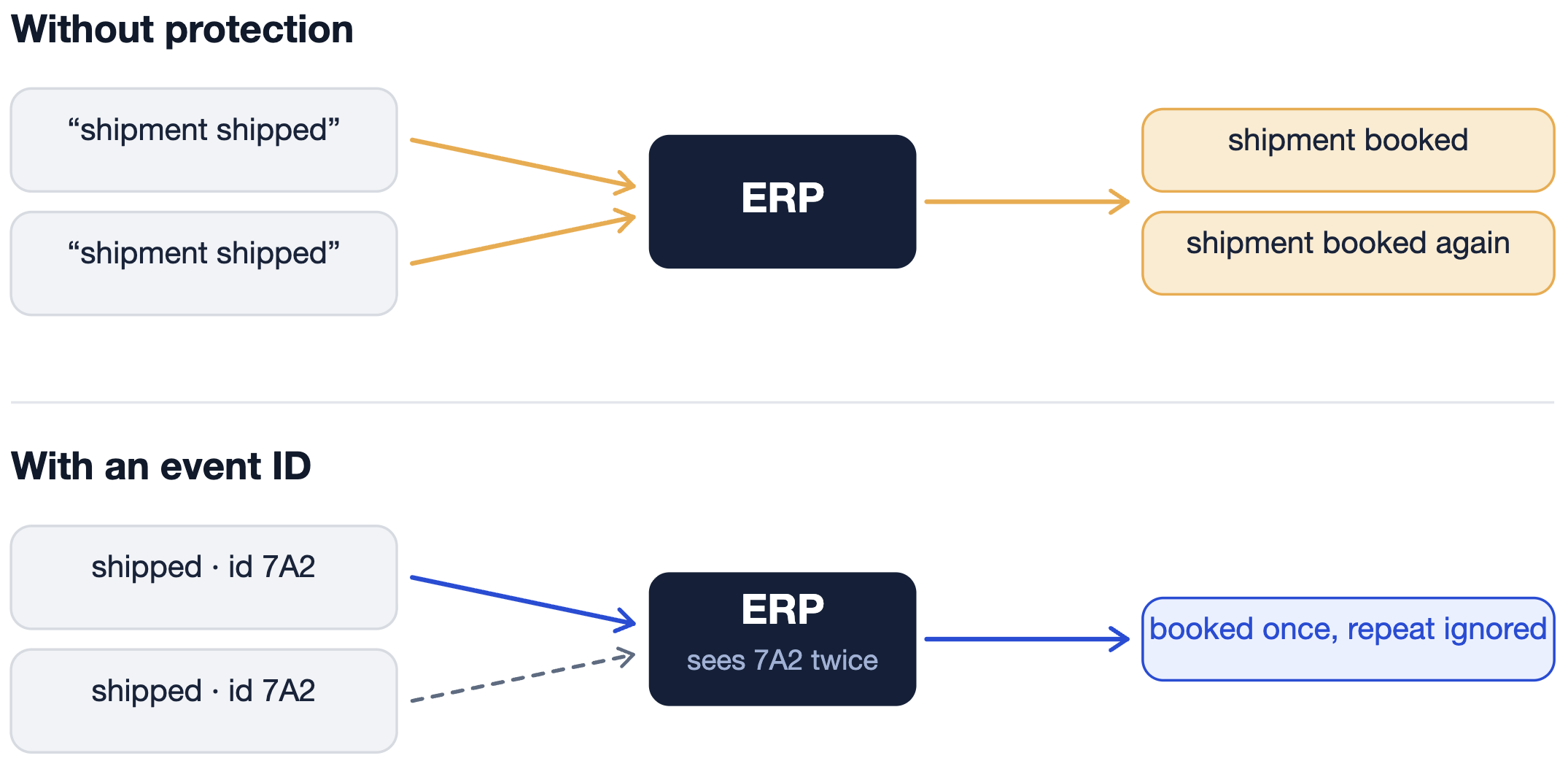
The same care applies to the other ways messages fail. For example, if a message doesn't go through, the system sends it again without re-booking anything that already went through the first time. If a message is broken in a way the system can't handle on its own, it's set aside for a person to check. And if one system was offline for a while, the two compare records and fix any differences when it comes back.
Seventh: How to know the integration has been effective
Finally, the integration works when the ERP and software you connected end up holding matching, correct data and the actual task gets done. For example, If the ERP tells the warehouse to ship an order, “done” means the warehouse system created that order and the stock dropped by the right amount.
To prove it worked, track a few key measures before the integration and after, and compare like periods, for example, a normal month against another normal month, or a peak week against another peak week:
- how much data your team still keys in by hand
- how long data takes to sync between systems
- how many errors are left unresolved
- how far your stock counts and invoices drift from reality
- how long it takes from a delivery to the paperwork being ready
Case in point: A peer-reviewed case study of a Brazilian food distributor that unified its logistics data in one system tracked measures like inventory accuracy, on-time delivery, and logistics cost — and saw on-time delivery improve and logistics costs fall over the period.
Start with what you already have
You don't need to replace your ERP to fix what's broken around it. Most of the time the ERP is fine, and it's just being asked to run work it was never built for. The fix is to connect it to the systems that do that work, and to do it in a specific order. Agree who owns each piece of data, set the rules for how it moves and what happens when something fails, handle the exceptions, and check the result in the systems.
None of that can be copied from a template, because it depends on the exactsystems you're running and how your operation runs. That's why the first step should be a clear picture of what you have.
If you feel like it, let’s discuss your ERP integration requirements during a free 30-minute consultation. Tell us your current systems and the process you need to connect, and we'll map what integration would involve: what to connect, in what order, and what it would take.
Frequently asked questions
Can we integrate logistics software without replacing your ERP?
Yes, and usually you better keep it. The ERP connects to other systems through integrations. How cleanly depends on the interfaces your ERP exposes, for example documented API connects directly, while an older install through the custom layer.
Which system should own inventory and shipment data?
We suggest deciding per field. The WMS owns the live stock count, for instance, because it’s closest to the goods, and the ERP owns the financial value because it’s your system of record. When they disagree (for example, ERP says 400, but WMS 380) the owner’s number wins and the other reads it. So you should settle which system owns what before connecting anything.
Does every logistics data flow need real-time synchronization?
No, you have to match the speed to the operation. A new order has to reach the warehouse and TMS instantly because nothing starts until each system has it. For each flow, ask how much delay the operation can absorb, then sync what's urgent and batch the rest.
How should integration handle partial shipments and returns?
Link every record back to the original order, then correct the numbers across systems. The financial side is what to verify since when the physical record changes, the money has to move with it, otherwise the invoices drift.
What information is needed to estimate an ERP integration project?
You’ll need information related to the systems (named products), their versions, the data flows (what moves, which way, how fast), sample data from each system, and your acceptance criteria, in other words, what "done" looks like in concrete terms. Bring those and the estimate reflects your actual setup instead of a generic range.